Cosmos is now three times lighter than last year
A meeting tool only has to behave for 45 minutes. Cosmos sits open all day, next to everything else on your machine, so heavy was never an option.
Every quarter we test it the hard way: real machines, every browser we support, and 150 bots from 15 regions trying to break it. The July run is done and every fix is live.
🏆 Lighter than Google Meet, Zoom and Teams
You'd assume a video call is a video call. We checked.
Same laptop, same five-person call, everyone's camera on. Cosmos asked less of the machine than Google Meet, Zoom and Microsoft Teams. Less CPU and less GPU, not one at the expense of the other.
⚡ Three times lighter than we were
Same test, same machines, 16 months apart.
| March 2025 | July 2026 | Improvement | |
|---|---|---|---|
| 90-person call (Windows app) | ~17% CPU | ~5% CPU | ~3.4x lighter |
| Mid-sized call (4GB laptop, Edge) | ~71% CPU | ~40% CPU | ~1.8x lighter |
| Mid-sized call (Mac, browser) | ~50% CPU | ~23% CPU | ~2.2x lighter |
💡 Mac numbers look bigger than they are. macOS counts one core, not the whole machine, so divide by your core count.
📊 Big calls run lighter than you'd think
A 90-person all-hands asks about as much of your laptop as a 20-person team call. Your machine only draws the faces on your screen, not everyone in the room, so the load stops climbing once your gallery is full.
- 20 people — about 4% of your CPU
- 90 people — about 6% of your CPU
- Sitting in Cosmos all day — about 1.5%
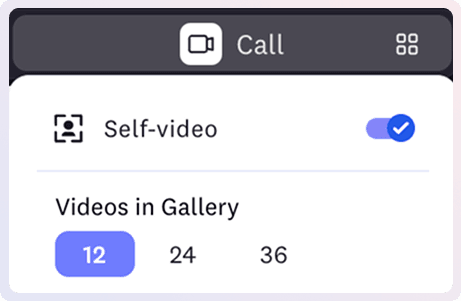
If your machine ever feels slow, turn your gallery down. Showing 12 faces instead of 24 means fewer videos to draw, and Cosmos asks less of your laptop straight away.
🔍 How we keep it that way
Every run works the same way: same machines, same scenarios, everyday actions repeated 5, 10 and 30 times until something gives. We fix what it finds, then run it again to prove it held.
Read everything we fixed in July.
None of this comes from a clever rewrite. It is a consistent method: we show up quarter after quarter and ask the same question, can we do this with fewer resources? Here is how we test.