
Meeting Rooms for Video Calls
Jumping between softwares reduces productivity. Cosmos Meeting Rooms bring everything into a single space: HD video calls, embedded whiteboards and apps, breakout rooms with 2-click setup, AI recording—all without leaving the room.
Schedule via calendar or start spontaneous sessions, and move conversations from Personal Rooms to Meeting Rooms without sharing links.
What are Meeting Rooms?
Dedicated spaces for structured group collaboration where everyone connects to the same call. Schedule via calendar integration or start spontaneous sessions—guests join with a simple link, no account required.
.png&w=3840&q=75)
Why use them?
- Support up to 200 participants with HD video and crystal-clear audio (196 kbps)
- Split into breakout groups instantly with automatic distribution—no 15-minute coordination nightmare
- Embed collaboration tools directly in meetings with Cosmos Apps (whiteboard, Miro, Figma, games)
- Record sessions in 1080p with AI transcription and summaries built-in
- Give guests access without account setup—just share a link for professional meetings
- Transform passive listening into active collaboration with reactions, polls, and hand raise features
- Move conversations from Personal Rooms to Meeting Rooms spatially—no new links to create and share
How it works
Meeting Rooms function like conference rooms where everyone can see and hear each other. The entire room operates as a single video call—schedule via calendar or start spontaneous sessions with teammates.
Built-in toolkit: Lock for privacy, Invite for bringing others in, Record for AI transcriptions, Hand Raise and React for engagement, Breakout for splitting into groups, Timer for tracking activities, and Apps for launching collaborative tools. Everything in one platform, no external links required.
When you're talking with someone in their Personal Room and the conversation needs structure or more participants, simply move together to a nearby Meeting Room. No creating new meeting links, no "let me send you a Zoom"—just walk to the room and continue.
.png&w=3840&q=75)
Call Quality & Screen Sharing
- Crystal-clear HD video with active noise cancellation
- 4K multi-party screen sharing with easy switching between participants' screens
- Resolution optimisation settings (document mode for crisp text, video mode for motion)
- Background blur and virtual backgrounds to maintain professionalism
- 1080p recording with AI-powered transcription and summarisation via Cosmos Replay
.png&w=3840&q=75)
Breakout Rooms
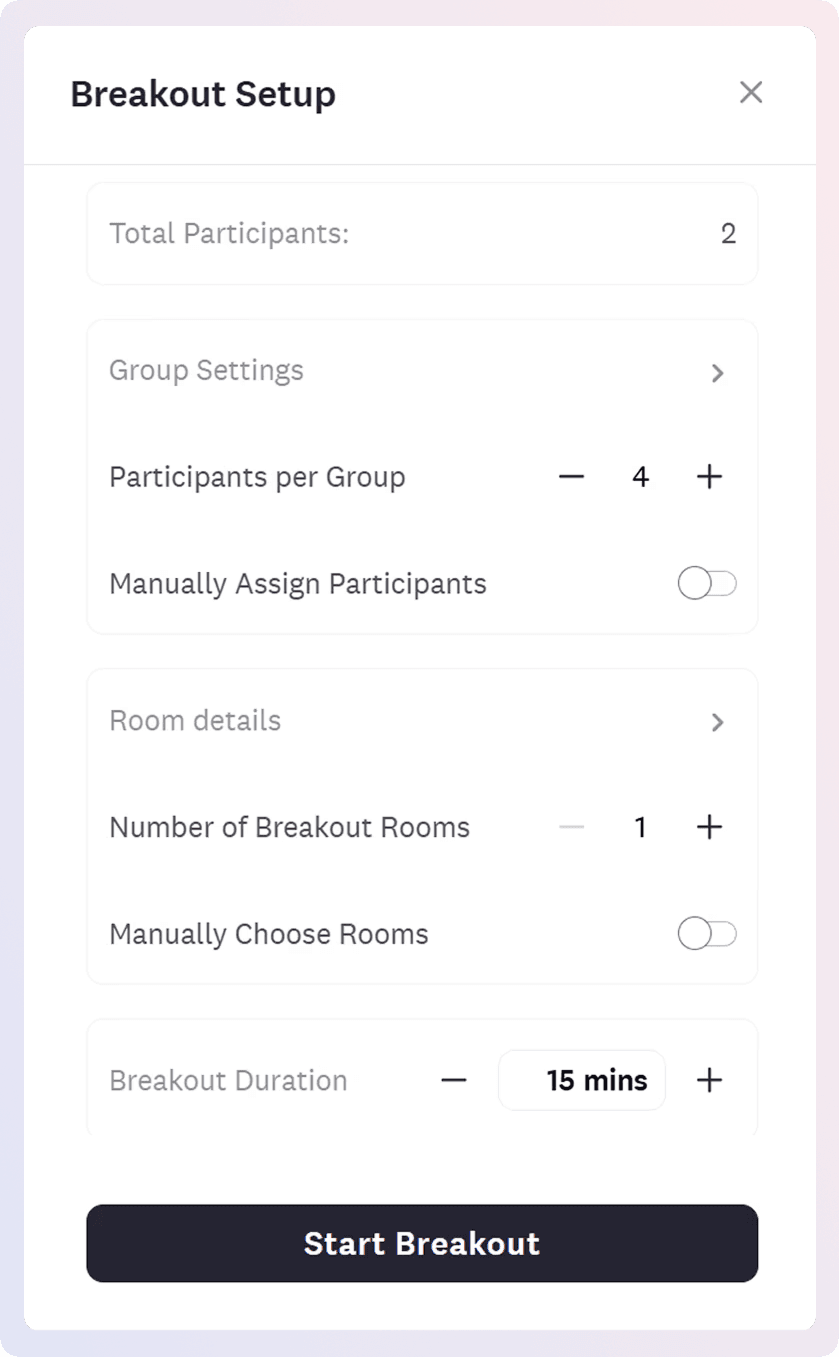
Split meeting participants into smaller groups during workshops or team activities. Define group size and duration, and participants are automatically distributed to nearby rooms with a built-in countdown timer. One-click return brings everyone back to the main room when breakouts end.
Why it matters: Zoom and Google Meet create coordination chaos—participants don't join, get kicked back to main sessions, or require manual invitations. Cosmos automates distribution with 2 clicks vs 15-minute setup nightmare.
Advanced controls:
- Manually assign participants for specific pairings or let Cosmos distribute automatically
- Move people between rooms during active breakouts to rebalance groups
- Broadcast voice and video to specific rooms or all rooms simultaneously with 2-minute warnings
- Monitor all breakout rooms from a single view to see what's happening everywhere
- Choose specific rooms for each breakout group—position related groups near each other
- Pre-assign embedded apps or documents to breakout rooms so tools are ready when they arrive
- Works seamlessly across desktop and mobile devices
Video Views
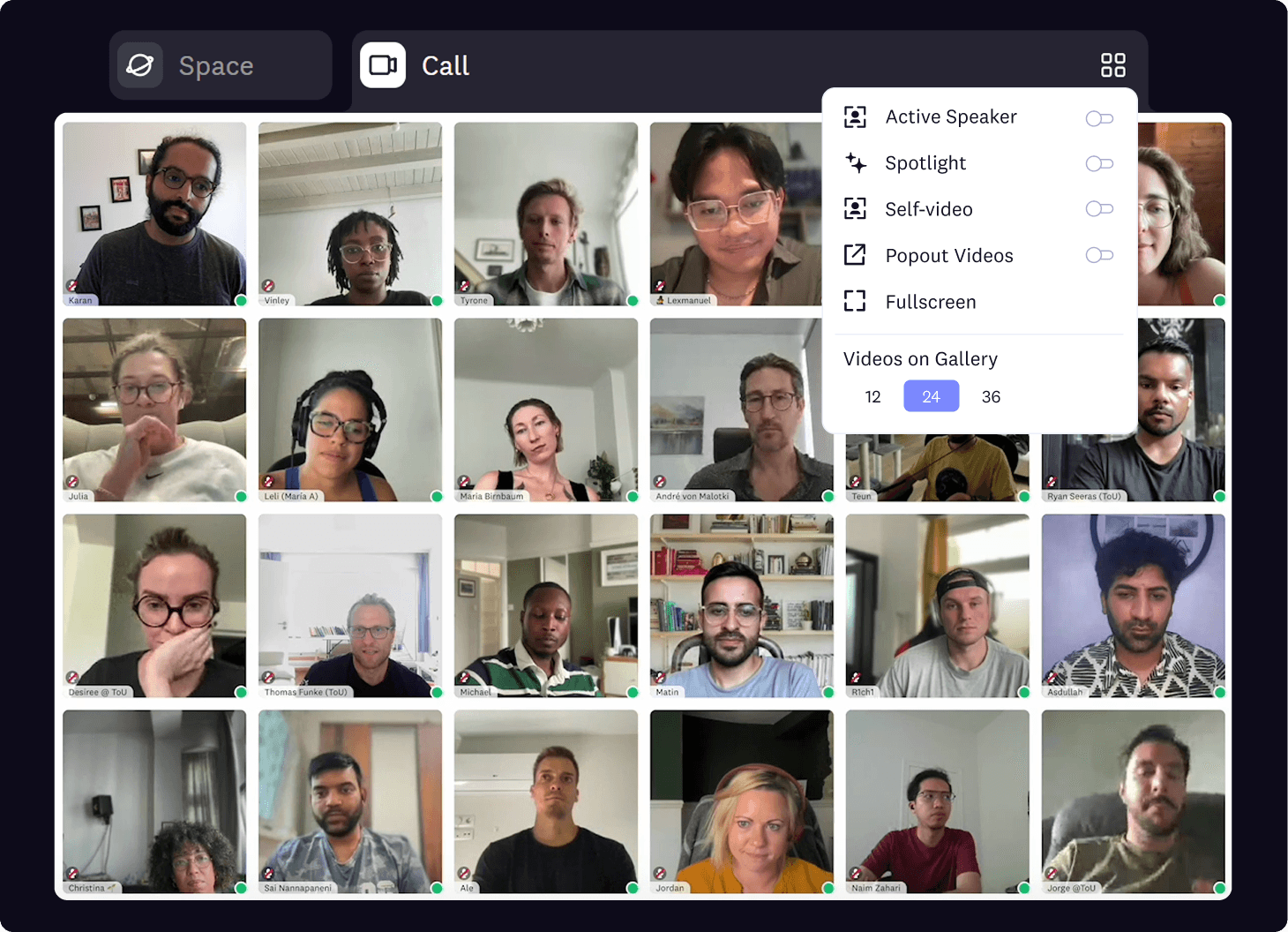
- Multiple view modes: space view (see spatial office), gallery view, pinned videos
- Admin spotlight controls to highlight speakers for all participants during presentations
- Conversation chat with file sharing, reactions (👍 ❤️ 😂), and polls for quick decisions
- Hand raise feature so participants can signal without interrupting
- Flexible space permissions to control what external participants can access
When to use Meeting Rooms
Ideal for team standups, workshops and presentations, private conversations, brainstorming sessions, client meetings, and all-hands meetings. They provide structure when you need everyone's full attention or when discussing topics that require privacy.
- For quick questions and instant collaboration, use Personal Rooms
- For silent co-working with accountability, use Focus Rooms
- For spontaneous networking after meetings, move together to Spatial Areas
Why it matters
- Stop juggling multiple tools - Everything in one platform: video, breakouts, whiteboard, Cosmos Apps, recording, transcription. Jumping between softwares reduces productivity; Cosmos keeps everything in one space so meetings flow smoothly and teams can focus on collaboration, not tool-switching.
- Breakouts without coordination nightmare - Define group size and duration and participants are automatically distributed. No participants stuck in limbo, no manual invitation lists, no "can everyone see the breakout rooms?" confusion. Two clicks vs 15 minutes of setup. Real workshops and training sessions where breakouts actually work. Learn how to use them here.
- Move conversations spatially without creating links - Talking with someone in their Personal Room and need to bring in teammates? Walk together to a nearby Meeting Room—no creating Zoom links, no "let me send you a Meet," no friction. This is the spatial advantage: conversations flow naturally between spaces without link-sharing coordination.
- Scales 5 to 200 with same ease - Whether it's a 5-person standup or 200-person all-hands, Meeting Rooms handle it without complexity creep. Zoom feels different at scale; Cosmos maintains simplicity.
- Guest access without friction - Clients and external collaborators join with a link, no account required. Professional environment that builds trust, not "please create an account and verify your email" barriers that waste time.
- Transform passive meetings into active collaboration - 67% of meetings are considered failures because they're passive listening sessions. Reactions, polls, hand raise, embedded tools, and breakouts create engagement so meetings actually deliver outcomes instead of draining energy.
- All-in-one reduces cognitive strain - Platform switching causes stress and exhaustion. When you have video in Zoom, whiteboard in Miro, notes in Notion, and chat in Slack, meetings feel transactional and draining. Cosmos centralises everything so teams can focus on the work, not the tools.
Pro Tips
- Name your Meeting Rooms clearly—"Engineering Pod A," "Client Meeting Room," or "Classroom 101" helps participants know where to go
- Lock the room for confidential meetings to prevent interruptions from teammates walking in
- Optimal breakout setup: Use groups of 3-4 people for maximum participation and 5-10 minute durations to maintain energy
- Prepare rooms in advance: Set up embedded apps, whiteboards, or documents in specific rooms before starting breakouts so groups can dive straight into work
- Combine with Spatial Areas after structured meetings end—participants can continue discussions naturally by moving together in open spaces for networking
- Take advantage of Cosmos Replay for team members who couldn't attend, so everyone stays aligned without scheduling catch-up meetings