We know that our software needs to be performant, otherwise it shouldn't exist. No one wants a piece of software which isn't performant.
That is why we test Cosmos the hard way, every quarter. A fleet of 150 bots joins from 15 regions and puts Cosmos under more load than any real workday ever will: every platform and browser we support, every call size from a solo session to a 150-person all-hands, for days at a stretch. This post explains the method: what we measure, why each measurement exists, why it is important for you and how it all runs.
The results of the latest run are in our July 2026 results post.
An app you keep open all day has no right to be heavy
A meeting tool has to behave for 45 minutes. A virtual office has to behave for eight hours, every working day, alongside everything else on your machine.
Our customers keep Cosmos open all day; it is where their team sits. If our software chokes their laptop, they cannot design, code, render or take a sales call. That is unacceptable, and it is why we treat resource usage as a product need rather than an engineering afterthought.
So we hold ourselves to a standing target: sit at the low end of CPU, GPU and memory usage, and re-prove it on a schedule, not just at launch.
We measure everything from a solo session to a 150-person call
Every run works through the same chunks, in order, and each one exists to prove something the others cannot:
- Alone. Most of a working day is nobody talking. This measures the cost of simply being present: connected, visible to your team, ready to talk. It is the state you spend most of your hours in, so it has to be the lightest.
- A 2-person call. The most common call there is: quick questions, 1:1s, pairing sessions. This proves that everyday conversations start instantly and stay light enough to happen many times a day.
- A 20-person call. A full team in one room, just under our gallery's 24-video cap. This measures the heaviest media load a machine ever renders: every video on screen at once.
- A 90-person call. This proves that resource usage stopped climbing at 24, which is the promise our architecture makes.
- A 150-person call. The full-company all-hands. This proves the largest realistic scenario still runs comfortably on an ordinary laptop.
For each chunk we capture CPU, GPU and memory, in both map view (moving around the space) and call view (the meeting itself), in listening mode and with mic and camera on. Everything is recorded on the same machines as previous runs, so run-on-run numbers stay comparable.
A 150-person call must cost the same as a 24-person call
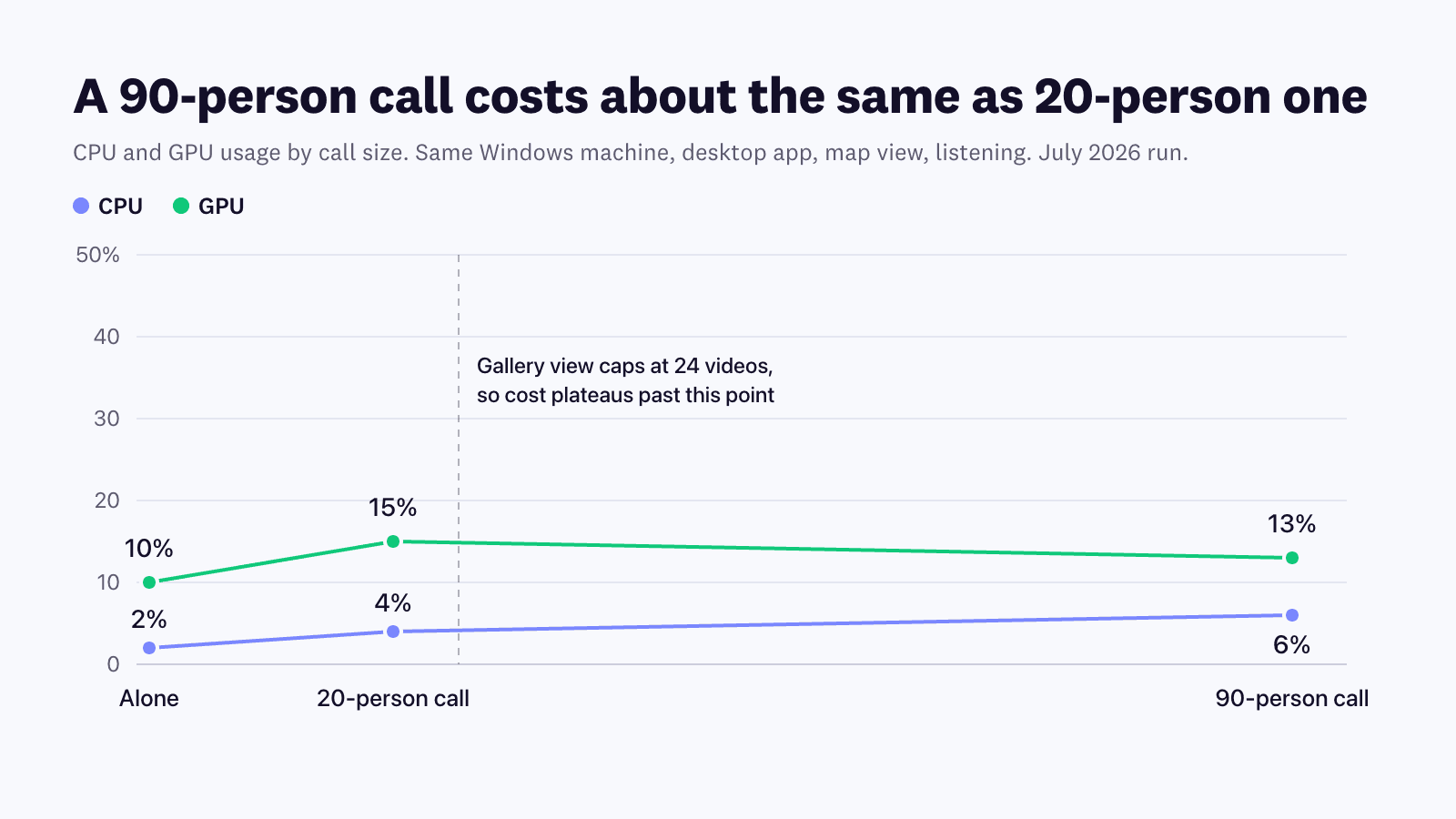
Cosmos calls are architected to ensure that resource usage doesn't scale linearly with call size. Right now Cosmos uses more resources as the number of videos increases, up to the number of videos you've selected to see on a single page. Beyond that, the videos go to the next page, and resource usage stops scaling linearly.
We run our tests at the 24-video setting, so resource usage may climb up to 24 participants, and past that it must plateau, regardless of call size. CPU, GPU and memory are the fundamental metrics. If any of the lines keeps climbing past 24, something is subscribing to media it should not be, and we go digging.
We catch memory leaks regularly
A team that claims its long-running app has never leaked memory is a team that has never looked. Leaks happen in every codebase; what matters is whether they are caught and fixed regularly.
The stakes are specific to our category. A leak that costs a few hundred megabytes is invisible in a 45-minute meeting, but an app that stays open for eight hours gives it all day to compound: quietly banking memory until the fans spin, other tools slow down, and the only cure is a restart.
We hunt leaks two ways. We keep Cosmos running for long stretches, tracking resource usage over time the way a normal workday would. And we use repetition: take a base reading for an everyday action, repeat that action 5, 10 and 30 times, and watch whether memory comes back down.
The actions are often repeated by our users:
- turning your mic on and off
- turning your camera on and off
- switching to a different microphone or camera
- changing your status between Focus and Available
- starting a screenshare, stopping it, or watching someone else's
- turning noise cancellation on and off
- joining and leaving calls
If memory grows and does not come back down, we mark it, reproduce it on other machines and platforms to confirm it, fix it, and run the whole sequence again.
How we run it: every platform, 150 bots, the toughest call possible
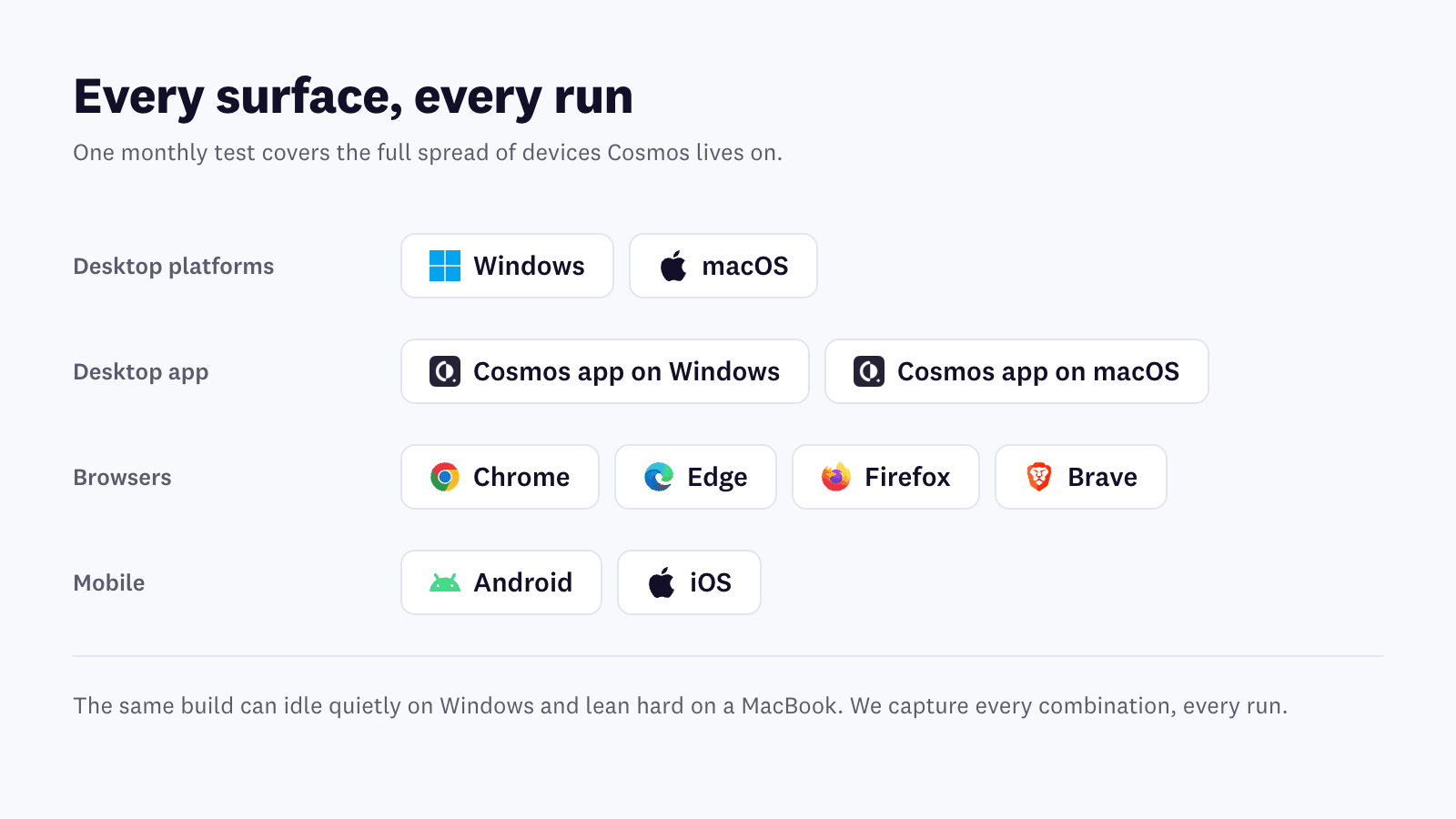
We test every surface Cosmos lives on. Windows and macOS; the Cosmos desktop app on both; Chrome, Edge, Firefox and Brave; Android and iOS. Testing one platform tells you very little: the same build can idle quietly on Windows and lean hard on a MacBook, and a browser tab behaves nothing like the desktop app. We capture every combination, every run.
150 bots test Cosmos the way a real company uses it. We used to run these tests with people, and the iterations were painfully slow. So we built our own bot fleet to replicate how real users behave in Cosmos: joining from 15 regions with 10 bots per region, running on slow machines with low bandwidth, streaming video and audio so the media pipeline does real work, and moving through the space the way actual teams do. We can find an issue, ship a fix and re-run the identical scenario the same day.
We test the toughest call possible. Most large calls follow a predictable pattern: four or five hosts speaking, everyone else listening. We test something far harder: a big call where around 16 people are speaking at once, everyone has their camera on, and some are moving through the space, joining and leaving mid-flow. If Cosmos stays light under this load, everyday usage has headroom to spare.
Every run competes with Google Meet and with the last run's numbers. We benchmark call view against Google Meet, running the same scenarios side by side on the same machine; comparing against yourself is comfortable, comparing against one of the most widely used meeting tools in the world is not. And every run is compared with the last one: a fix only counts if the next run's numbers are lower, and the long-term trend has to point one way, down.
AI turns days of log-reading into hours. Each run produces a huge volume of readings and logs from our own test machines and bots. We use modern AI models to help trace where a performance issue starts, so the time goes into fixes instead of searching. Then we iterate: find issues, fix them, test again.
Performance is a promise we re-prove every quarter
This process is not a launch-week sprint. It is second nature: automated to the point where a 150-person global test call is a fleet command away, and disciplined to the point where it has run quarter after quarter, for years, on the same machines.
It pays off in numbers we publish. The same large call that cost 17% CPU on our reference machine in March 2025 costs 5% today; the full arc, along with everything our latest run found and fixed, is in our July 2026 results post.
For you it means something simpler. Focus on your work and collaborate with your team; keeping resource usage low is our job, and we do it so you never have to think about it. That is what it takes to build a virtual office you can live in all day.
Ready to try Cosmos Video?
See how a persistent virtual office changes the way your team works. Free for up to 4 concurrent users — no credit card, no time limits.
Tags
- performance testing
- virtual office performance
- video call cpu usage
- memory leak testing
Stay in the loop
Get the latest articles in your inbox. No spam, unsubscribe anytime.