The first two weeks of a remote job can tell a new hire a great deal about whether they'll stay. Not the benefits package, not the salary — the experience of those first days. Do they know what's expected? Do they feel connected to anyone? Can they find the information they need without sending five Slack messages and waiting a day for each response?
Too many remote onboarding programs answer "no" to at least two of those questions. The result is predictable: slower time-to-productivity, higher early attrition, and new hires who feel like contractors rather than colleagues.
This playbook addresses that gap with a structured approach that combines artificial intelligence tools with human-centred connection, built around a virtual workplace where new hires can actually experience the organisation rather than just read about it.
Why traditional remote onboarding falls short
Remote onboarding has three consistent failure modes: information overload in week one, social isolation that persists for months, and a complete absence of the informal learning that happens naturally in physical offices.
New hires receive document dumps, are added to numerous Slack channels, and attend a calendar full of one-hour orientation sessions that they'll retain only in part by the following Friday. Meanwhile, the spontaneous conversations — the ones where a colleague explains how things actually work rather than how the handbook says they work — often don't happen because there's no virtual equivalent of the hallway or the coffee corner.
Artificial intelligence tools don't solve the human connection problem on their own. But they do address the information management problem effectively, freeing up the human elements of onboarding to focus on relationship-building rather than logistics and document transmission.
Build the onboarding foundation before day one

The quality of a new hire's first day is determined largely by what happens before it. Preparation work that used to take an HR coordinator several hours to complete can now be done significantly faster with AI assistance, and the output can be more personalised than a generic welcome packet.
Before the new hire's start date, use AI tools to:
- Organise role-specific documents and training materials into a structured sequence rather than a shared folder of unordered files. AI can categorise existing content by topic, complexity, and relevance to the specific role, producing a learning path rather than an archive.
- Generate a personalised 30-60-90-day plan based on the role description, team structure, and key milestones. This gives new hires clarity about what success looks like at each stage before they've even logged in for the first time.
- Set up the new hire's virtual workspace, introductions, and access permissions in advance. In a Cosmos Video environment, this means their personal room, team channels, and colleague introductions are ready before they arrive.
Remote team collaboration starts before the first working day. A new hire who receives a personalised schedule, knows who their day-one contacts are, and has a clear sense of the first week's structure arrives with confidence rather than anxiety.
Create a connected first day in Cosmos Video
The first-day experience in a remote environment has to do something that email and document access cannot: give new hires a felt sense of the organisation and the people in it.
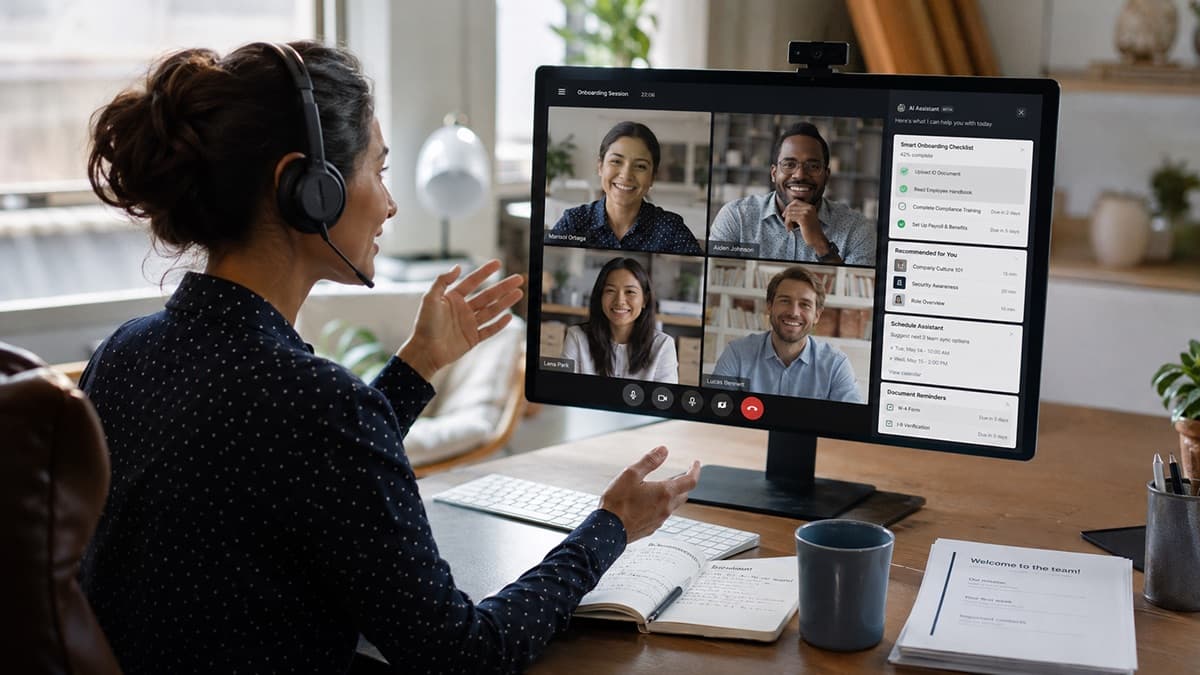
A persistent virtual office like Cosmos Video addresses this directly. New hires don't join a series of scheduled video calls — they enter a workspace where colleagues are visibly present, where dropping into a conversation can feel closer to walking over to someone's desk, and where the informal social layer of work has a place to develop.
Structure the first day to combine formal orientation with genuine human interaction:
- Welcome the new hire with a live video introduction to their immediate team in a shared Cosmos space, keeping the session short and conversational rather than presentational.
- Give new hires access to personal rooms where colleagues can drop by informally, replicating the kind of low-stakes interaction that builds familiarity faster than any scheduled icebreaker.
- Schedule one unstructured co-working block in the first two days — time in the virtual office with no agenda, where questions can surface naturally, and the new hire can observe how the team actually works together.
Use artificial intelligence to accelerate learning

The volume of institutional knowledge a new hire needs to absorb is substantial, and no amount of structured onboarding can eliminate that reality. What artificial intelligence tools can do is make that knowledge searchable, summarised, and accessible on demand rather than locked in colleagues' heads or buried in document archives.
Research and practitioner guidance on AI in onboarding point to practical uses such as automating repetitive administrative work, personalising learning paths, and providing real-time support — while emphasising that AI should amplify, not replace, the human onboarding process.
Practically, this means:
- Generate transcripts and searchable summaries from onboarding sessions so new hires can revisit specific information without rewatching full recordings or asking colleagues to repeat explanations they've given a dozen times.
- Turn recorded onboarding sessions into reusable learning materials using Cosmos Replay, converting one-time sessions into persistent resources that serve every future hire in the same role.
- Always route AI-generated summaries through human review before treating them as authoritative. AI tools compress and synthesise effectively but can misrepresent nuance or context, and onboarding materials that contain errors create problems that compound over months.
Design a 30-60-90-day remote onboarding journey
Onboarding ends on paper far before it ends in practice. A 90-day framework acknowledges that reality and gives both the new hire and their manager a shared roadmap.
Days 1-30: Understand the role, team, tools, and culture. The primary goal in the first month is orientation, not output. New hires should be learning processes, building relationships, and asking questions without pressure to demonstrate full productivity.
Days 31-60: Begin independent work and cross-functional collaboration. The second month shifts toward contribution. New hires take ownership of defined deliverables, participate in team decisions, and begin developing relationships outside their immediate team. Distributed workforce management practices should ensure that remote new hires have equivalent access to cross-functional relationships as in-office peers.
Days 61-90: Take ownership, gather feedback, and establish goals. The third month closes the onboarding loop. Formal performance conversations should happen here, informed by the 30-60-90 plan established before day one, giving both parties clear language for assessing progress.
Strengthen remote team collaboration through structure and spontaneity
The social architecture of remote work doesn't build itself. Left unstructured, remote teams default to task-focused communication and miss the relationship-building that happens more naturally in physical environments.
Build both structure and spontaneity into the onboarding period:
- Schedule regular mentor check-ins at defined intervals (weekly in month one, biweekly in months two and three) with a standing agenda that includes both task support and cultural questions.
- Use Cosmos Video channels and persistent chat to maintain asynchronous connections across time zones, so distributed workforce management doesn't mean new hires in different time zones experience a diminished version of the onboarding program.
- Create a dedicated peer learning channel where new hires can ask questions that don't warrant a manager's attention — the kind of small clarifications that are easy to ask in an office and feel disproportionately formal in an email.
Connect onboarding with distributed workforce management
Onboarding is the first test of your distributed workforce infrastructure. How you manage a new hire's first 90 days reveals exactly where your systems, documentation, and communication practices have gaps.
Use the onboarding period as a diagnostic:
- Track milestone completion and engagement patterns without invasive monitoring. Cosmos Video offers Space Insights & Analytics for collaboration patterns, peak activity times, and individual presence; use those signals carefully and transparently rather than relying on keystroke logging or activity surveillance.
- Standardise core onboarding elements across roles while preserving role-specific customisation. The administrative experience (access, documentation, introductions) should be identical across roles. The learning path should be specific.
- Build a feedback loop at 30, 60, and 90 days using structured questions to surface both gaps in the onboarding program and early signals of disengagement or role misfit before they lead to attrition.
For teams building deeper technical foundations in AI tools for workforce applications, the Research.com comparison of best artificial intelligence graduate degrees covers programs that develop the applied AI literacy increasingly relevant for HR and people operations leaders.
Keep human connection at the centre

Artificial intelligence tools handle the logistics and knowledge management components of onboarding well. They do not handle relationship-building, and organisations that automate the human elements of onboarding in addition to the administrative ones risk weakening the interpersonal layer that makes onboarding effective.
Protect the human layer:
- Maintain active manager involvement throughout the 90-day period. AI-generated check-in summaries are useful inputs, not substitutes for actual conversations.
- Review all AI-generated materials for accuracy and bias before deploying them in onboarding contexts. New hires who receive incorrect information in their first weeks often internalise it before anyone catches the error.
- Be transparent with new hires about which tools are being used and how their data is handled. Trust is built in the first 90 days and is hard to recover once broken.
Remote onboarding checklist
- Preparation completed before day one: role-specific materials organised, schedule established, access permissions configured, Cosmos Video workspace ready.
- Clear goals, responsibilities, and success measures communicated before the start date.
- Day one is structured around human connection, not document consumption.
- Regular feedback checkpoints scheduled at 30, 60, and 90 days.
- Mentor and peer support systems are established with defined cadences.
- AI-generated materials are reviewed for accuracy before use.
- 30-60-90-day progress reviewed in a formal conversation, not just tracked in a system.
Key insights
- The quality of a new hire's first two weeks strongly influences early confidence, belonging, and clarity, and onboarding investment compounds significantly over time.
- Artificial intelligence tools effectively reduce the administrative burden of onboarding, but human-connection elements require deliberate structural design rather than automation.
- A persistent virtual office like Cosmos Video creates a dedicated space for an informal interaction layer that scheduled video calls cannot replicate and that remote onboarding consistently lacks.
- Remote team collaboration requires both spontaneous and structured social opportunities. Providing only one produces either chaos or formality — neither of which builds genuine team cohesion.
- The quality of distributed workforce management becomes visible during onboarding. Gaps in documentation, communication practices, and knowledge accessibility surface within the first 30 days and should be treated as system feedback rather than individual failure.
FAQs
How long should remote onboarding actually last? Ninety days is a practical minimum for a structured remote onboarding program, but many employees need support well beyond the first month. Research and HR guidance consistently frame onboarding as a longer journey than a week-one orientation, and recommend tracking progress through measures such as time-to-productivity, retention, new-hire surveys, engagement, performance, and informal feedback.
Can AI tools replace a human onboarding coordinator? No, and the attempt produces worse outcomes. AI tools handle document organisation, scheduling, knowledge retrieval, and summarisation effectively. Human coordinators handle relationship facilitation, cultural interpretation, and the judgment calls that determine whether a new hire feels genuinely welcomed. Both are necessary.
How does Cosmos Video specifically support remote onboarding? Cosmos Video provides a persistent virtual office where new hires can meet colleagues naturally, join spontaneous conversations, access personal and team rooms, and revisit recorded sessions through Cosmos Replay — creating the social and learning infrastructure that email and scheduled calls cannot replicate.
What's the most common remote onboarding mistake? Treating the first week as the entire onboarding program. Information delivered in week one without reinforcement, relationship-building, and progressive responsibility is less likely to stick or translate into confident performance by week four. The 30-60-90-day framework exists precisely to prevent this pattern.
Ready to try Cosmos Video?
See how a persistent virtual office changes the way your team works. Free for up to 4 concurrent users — no credit card, no time limits.
Tags
- remote onboarding
- ai tools
- 30-60-90 plan
- distributed workforce management
Stay in the loop
Get the latest articles in your inbox. No spam, unsubscribe anytime.