Why Cosmos Is the Best Zoom Alternative in 2026
If you are still using Zoom in 2026, you are overpaying for a tool that drains your battery, hogs your CPU, and has a track record of lying about how it handles your data.
Zoom has paid over $235 million in lawsuit settlements for faking encryption claims and sharing user data with Facebook. Their free plan cuts you off at 40 minutes. And their per-seat pricing means a 20-person team pays for 20 licences — even if only 10 people are ever online at the same time.
People are switching. The search for Zoom alternatives has never been higher — and if you have not started looking for an alternative to Zoom yet, you are already behind.
There are plenty of meeting apps like Zoom on the market, but most comparison articles give you a list of ten tools and no real data. This blog is different. We break down exactly why remote teams are moving away from Zoom and towards Cosmos Video — a video-first virtual workspace built for remote teams, with no time limits on free calls, concurrent pricing that can cut your bill in half, and none of the security baggage. We will compare security, performance, features, and pricing head-to-head, backed by real data, real lawsuits, and real benchmark tests.

Zoom's Free Plan Has a 40-Minute Time Limit. Cosmos Doesn't.
Let us start with the most basic question: Does Zoom have a time limit? Yes. How long is a free Zoom meeting? How long is free Zoom meeting without paying? 40 minutes. That is the Zoom time limit on their free plan, and it is the single biggest frustration people have with the tool.
You are mid-conversation with a client, mid-brainstorm with your team, mid-interview with a candidate — and Zoom ends the call. You have to restart, resend the link, and get everyone back in. It is disruptive, unprofessional, and entirely unnecessary. The Zoom free meeting time limit has been 40 minutes since 2022, and they show no sign of removing it. Between Zoom meeting limits on duration and the per-seat pricing, the free plan barely qualifies as free.
Cosmos Video's free plan has no time limit. None. You can bring up to four people into a call and talk for as long as you need. No countdown timer. No awkward "we need to rejoin" moments. If you are looking for a free alternative to Zoom with no time limit, this is it.
But it goes beyond the Zoom meeting duration limit. Cosmos includes recording with AI summaries on the free plan — with recordings stored on the cloud for seven days. On Zoom, meeting recording and AI summaries are locked behind paid plans.
If all you need is a free video conferencing tool that does not cut you off mid-sentence, Cosmos already wins.

Security: Zoom's $235 Million Track Record
Is Zoom secure? How secure is Zoom video conferencing really? If you look at the actual record — court filings, government agencies, Zoom security news, verified reporting — the answer is deeply concerning. Every few months, a fresh Zoom vulnerability surfaces, another Zoom security breach makes headlines, and the same question returns: Is Zoom vulnerable to the kinds of exploits that should have been fixed years ago? These are not accusations. These are settled cases — documented Zoom security vulnerabilities and security issues with Zoom where the company was found liable.
The Encryption Lie
Are Zoom meetings encrypted? Are Zoom meetings end to end encrypted? For years, Zoom claimed their calls were protected by Zoom end to end encryption. They were not. The Federal Trade Commission investigated and found that Zoom had been misleading users since at least 2016. The result: a formal complaint from the FTC and a requirement for Zoom to undergo independent security audits for 20 years.
Think about that. A regulatory body found Zoom's security claims so fundamentally dishonest that they imposed two decades of mandatory oversight. Zoom cloud infrastructure security standards were not meeting the bar they publicly claimed.
$85 Million Privacy Settlement
In 2021, Zoom settled a Zoom class action lawsuit for $85 million over privacy violations — often referred to as the Zoom CASA lawsuit. The Zoom lawsuit covered data sharing with Facebook, the Zoombombing epidemic, and the company's failure to protect user privacy. The settlement was approved by a federal judge — this was not dismissed or thrown out. Zoom paid because the evidence was that clear. If you search for lawsuits against Zoom, this is the most widely cited case.
$150 Million Securities Fraud Settlement
Shareholders filed their own lawsuit after discovering that Zoom's security claims were false. The stock had been inflated on the back of promises about encryption and privacy that turned out to be lies. The securities fraud settlement totalled $150 million — one of the largest in the video conferencing industry.
Data Shared with Facebook Without Consent
In 2020, Vice's Motherboard team revealed that Zoom's iOS app was sending analytics data to Facebook — even for users who did not have a Facebook account. Zoom had not disclosed this in its privacy policy. They only removed the Facebook SDK after the story went public and the backlash became impossible to ignore.
AI Training on Your Calls
In 2023, Zoom quietly updated its Terms of Service to allow the use of customer data — including call content — to train AI models. This was the biggest Zoom AI news story of the year. The Zoom AI companion security concerns were immediate and widespread. ToS;DR rated Zoom's terms low, placing them in "Grade D" — poor category for user rights. Zoom partially walked back the change, but the terms remain broad enough to raise serious concerns about how your meeting data is being used. For teams that need to know their calls are private, this remains one of the biggest Zoom meeting security issues.
530,000 Accounts on the Dark Web
In April 2020, cybersecurity firm Cyble discovered over 530,000 Zoom accounts being sold on dark web forums for less than a penny each — some given away for free. The credentials included email addresses, passwords, personal meeting URLs, and host keys.

Government Bans
The security failures were serious enough that governments and major organisations took action:
France banned Zoom for 2.5 million civil servants
Taiwan prohibited all government agencies from using Zoom
NASA restricted Zoom use
SpaceX banned Zoom entirely
How Cosmos Handles Security
Cosmos Video takes a fundamentally different approach to security:
No AI training on user data — your calls and content stay yours, full stop. No hidden Terms of Service clauses granting broad rights to your content.
GDPR compliant — full adherence to European data protection regulations
SOC 2 Type II certified — independently audited security controls
TLS 1.2+ encryption for all data in transit
AES-256 encryption for all data at rest
Your conversations belong to you. Cosmos does not use your meeting data to train AI models, does not share analytics with third parties, and does not bury data rights in fine print. Cosmos is one of the most secure alternatives to Zoom available today. For teams searching for secure Zoom alternatives or asking about Zoom video security, the comparison speaks for itself. Not only that, whenever you invite an external guest to your Zoom meeting, Zoom automatically starts downloading their app to your guest's system!
Performance: What Real Users Say and What the Numbers Show
Community Voice

Zoom issues go beyond security — Zoom performance problems, Zoom connectivity issues, and Zoom audio issues are among the most common complaints from remote workers. You do not have to take our word for it — go to any review site or community forum, and you will find the same complaints about Zoom lag, resource drain, and Zoom connection issues:
"When I turn on the camera, CPU usage goes above 60%, which also slows down screen sharing. When I turn off the camera, CPU usage returns to normal." — Zoom Community Forum, August 2025
"Zoom randomly crashes during meetings, particularly when I'm sharing my screen. The crash usually lasts anywhere from 20 seconds to a full minute, then Zoom reconnects itself." — Zoom Community Forum, June 2025
"Does anyone else find it ridiculous that the 'solution' to getting Zoom to stop freezing is turning off built-in Zoom features? Tried everything listed in these forums. Nothing worked." — Zoom Community Forum, March 2025
"I have identified Zoom 6.2.11 as the culprit driving absurd CPU levels on my Mac Studio. It forces corspotlightd and kernel-task to hit 200–400%. It stops when I erase Zoom from my computer." — Apple Community, February 2025
Zoom's own community forum has threads complaining about the performance - all from 2025. Users regularly report Zoom crashing mid-call, Zoom keeps crashing during screen shares, and high Zoom memory usage that makes their machines unusable.
If people are taking time out of their day to go to review sites and community forums to write about performance issues, the problem is real. These are not people with nothing better to do. They are putting in effort because they want others to know.
The Real Test: Original Benchmark Data
We did not want to rely on anecdotal evidence alone. So we ran our own performance test with identical conditions for both Zoom and Cosmos.
Hardware-

Internet-

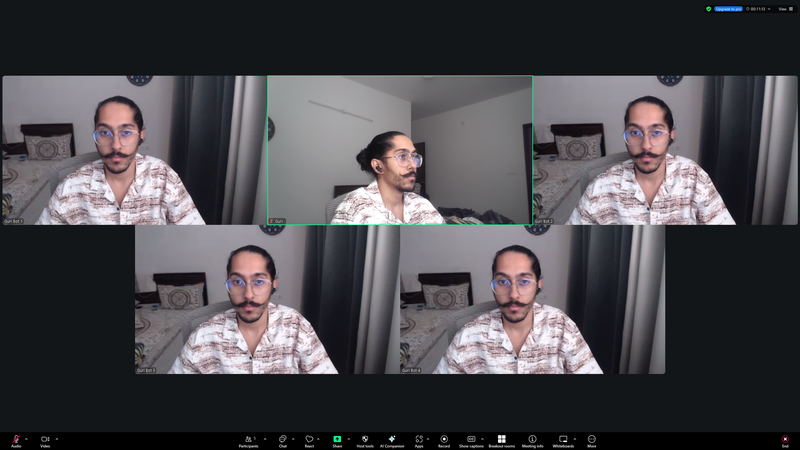
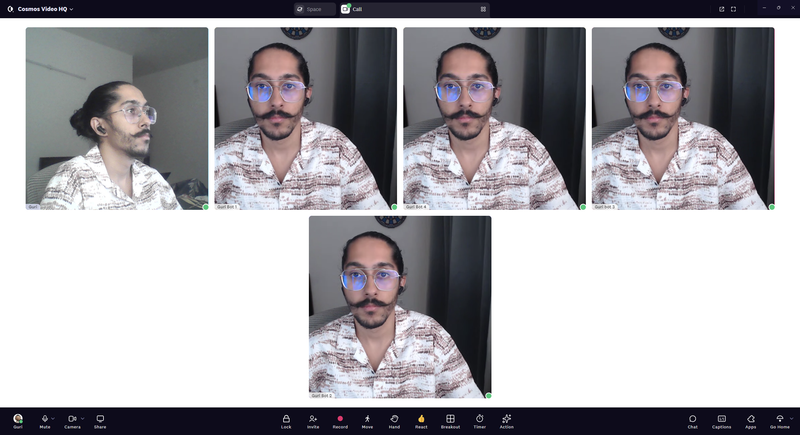
Test conditions: Five-person video call, all cameras on, same hardware, same internet connection, same time of day.
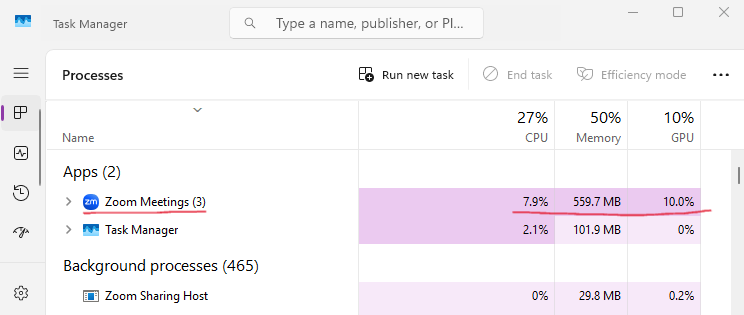
Zoom — 5-Person Call:
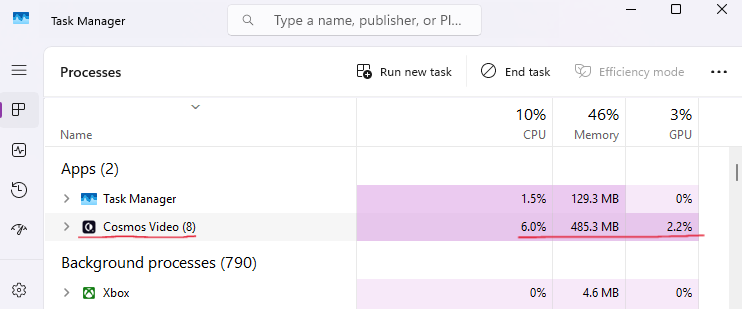
Cosmos — 5-Person Call:
Head-to-Head:
The GPU difference is the headline: Zoom uses nearly 5x more GPU than Cosmos for the same five-person call.
What does that mean in practice? If you are on a laptop — which most remote workers are — Zoom is making your fans spin louder, your hardware run hotter, your battery drain faster, and your other applications slower. Cosmos runs lighter, which means you can actually multitask during a call without your machine struggling.
And here is something worth noting: many laptops — particularly thin-and-lights and budget machines — do not have a dedicated GPU at all. On those devices, every bit of GPU work falls back onto the CPU. So when Zoom demands 10% GPU and the laptop does not have one, your processor has to handle video encoding, decoding, and rendering on top of everything else. The 24% CPU difference between Zoom and Cosmos in our test becomes even more pronounced on hardware without a dedicated graphics card.
Features: What Meetings Actually Need
The Baseline
Before comparing what makes Cosmos different, let us establish what every video conferencing tool should get right. These are the non-negotiables:
Both tools cover the basics. This is not a case where one platform is missing fundamental features. Zoom works. Cosmos works too.
But here is the difference worth noting: if you want to record Zoom meetings or use the Zoom meeting recorder with AI-powered Zoom meeting summary and Zoom meeting transcription features, you need a paid plan. The Zoom recording features are locked behind Zoom's paid tiers. Cosmos includes recording and AI summaries on the free plan with seven-day cloud storage — no upgrade required.
Where Cosmos Goes Further
This is where the tools diverge:
Let us break down why these matter.
Embedded Apps: In Zoom, if you want to use an external tool during a meeting — say, Google Doc or Miro — you need to go to the Zoom Marketplace, find the app, install it, configure it, and hope it actually works with your setup. In Cosmos, you paste a link into the call, and it opens right there for everyone. No marketplace. No installation. No friction. The difference sounds small until you are mid-meeting trying to pull up a design file and Zoom is asking you to install an add-on.
Watch Party: Zoom technically has a YouTube watch party app in their Marketplace. It is rated 2.6 out of 5 stars. Users consistently report that it simply does not work. Cosmos has watch party built in natively — no third-party app, just paste the YouTube link, and it will play in sync for everyone.
Screen Share Modes: If you need a free Zoom alternative with screen sharing that actually gives you options, Cosmos it is. Zoom gives you one screen sharing mode. Cosmos gives you three, each optimised for a different scenario. If someone on your team has a slower internet connection, the "Slow Connection" mode ensures they can still follow along without lag. Reviewing a document? "Standard" mode keeps text sharp and readable. Watching a video together? "Smoother Video" mode prioritises frame rate so the playback is not choppy. On top of that, Cosmos screen sharing goes up to 2880×1620 — nearly double Zoom's maximum resolution.
Multiple Simultaneous Calls: In Zoom, one meeting happens at a time. If your design team needs a quick sync while the engineering team is in their standup, someone has to wait. In Cosmos, because the platform is built as a persistent space rather than a point-in-time call tool, multiple conversations can happen simultaneously in different rooms.
Room Types: Zoom has one room type — the standard meeting room. Cosmos has five: Meeting Rooms for scheduled calls, Focus Rooms for silent co-working and body doubling, Spatial Areas with proximity-based audio where you walk close to someone to talk, Personal Rooms for instant walk-to-talk conversations, and Game Rooms where your team can play built-in games together — real games to play on Zoom alternatives without installing third-party apps. If you have ever searched for Zoom games to break the ice during team calls, you know the options are limited: Zoom has no native games, so teams end up cobbling together screen-shared browser tabs or downloading marketplace add-ons that barely work. Cosmos builds the games right into the platform. Each room type serves a different purpose — something a single meeting format cannot replicate.

Cosmos Is Not Just a Meeting Tool
Everything above compares Cosmos to Zoom as a meeting tool. But here is the thing: Cosmos is not just a meeting tool. It is a virtual workspace.
Zoom is something you open when you have a scheduled meeting. You click a link, join a call, talk, hang up, and close the app. Between meetings, your team is invisible. You have no idea who is around, who is available, or what anyone is working on. The only way to talk to someone is to schedule another meeting or send a Slack message and wait. That is why the term Zoom fatigue emerges.
Cosmos works differently. Your team has a persistent digital space — think of it as your virtual office. You can see who is online, who is in a meeting, who is heads-down in focus mode, and who is available for a quick chat. You do not schedule a meeting to ask a 30-second question. You walk over to someone's avatar and start talking — the connection happens in under 50 milliseconds.
This changes remote work in ways that a meeting tool simply cannot:
Spontaneous conversations come back. The "can I ask you something quick?" moments that happen naturally in a physical office — those disappear when your only option is scheduling a Zoom call or sending a Slack message. In Cosmos, you just walk over. Teams using Cosmos report 60 quick interactions daily in a 30-person space.
Spatial proximity audio recreates natural office flow. In a Cosmos space, audio connects based on proximity — move closer to someone, and you hear them, move away, and the audio disconnects. It is how conversation works in real life, and it means you can have a private chat in one corner of the room while a group discussion happens in another.
True Statuses give everyone control. Four intelligent availability states — Available, Listening, Focus, and Away — mean your team knows when someone can be interrupted and when they cannot. No more "can we talk?" anxiety. No more interrupting deep work. No more guessing if someone is free.
The office feeling returns, without the commute. Customers consistently describe Cosmos as getting their office back. Not a tool. Not an app. A place where the team works together.
"Cosmos has dramatically enhanced our productivity, culture and engagement. Our employee NPS increased by 20%." — Mike Williams, Production Manager, FRONTIER
"Everyone being available in our Cosmos space created a real sense of community. We go through crunch times much faster compared to back-and-forth messaging." — Keama, Accounting, Reconciled

Pricing: The Per-Seat Trap vs Concurrent Pricing
How Zoom's Pricing Actually Works
If you have ever searched for Zoom pricing, Zoom pro pricing, or the cost of a Zoom pricing plan, you have seen the headline number: $16.99/month (billed monthly) or $14.16/month (billed annually) per user on their Workplace Business plan. Whether you are comparing Zoom Workplace pricing or Zoom business pricing — the per-seat model is always the same.
On the surface, the cost of Zoom meeting pricing sounds reasonable. But here is the catch that Zoom's pricing page does not make obvious.
Even though one Zoom host can bring participants into a meeting, that does not help when different people on your team need to host their own calls. Your engineering lead has a standup. Your designer has a client review. Your manager has a one-on-one. They each need their own Zoom licence. You are not paying for "meetings" — you are paying for every single person who might ever need to start a call.
So for a 20-person team, you are paying for 20 licences. Zoom account pricing does not adjust based on actual usage — it does not matter that most of them are never in a meeting at the same time. And if you are looking at Zoom Workplace Pro pricing or Zoom AI pricing for their AI Companion add-on, the per-seat cost climbs even higher.
How Cosmos Pricing Works
Cosmos charges for concurrent seats — the maximum number of people using the platform at the same time. The Premium plan costs $8.80/month (billed monthly) or $7.70/month (billed annually) per concurrent user.
If your 20-person team never has 10 people online simultaneously — which is common for teams spread across time zones — you pay for 10 concurrent seats, not 20 individual licences.
The Maths
Monthly billing comparison:
Annual billing comparison:
Even in the worst-case scenario where every single team member is online at once, Cosmos is cheaper on both monthly and annual billing. But the real savings come from the concurrent model — most teams never have everyone in calls at the same time. A 50-person team with 25 concurrent users saves over $6,000 a year on an annual plan.
What Customers Say About Cosmos
"It allows a real-life feel to a virtual experience which fosters a deep sense of connection! It is MORE than what typical video conferencing tools provide — this builds community!" — Shade O., Events Strategist, G2 Review
"It's definitely the best way we've found to work remotely, and it's the closest we've felt to being in person. Clicking on someone to start a conversation is far more natural than constantly sending Zoom links — just like tapping on someone's shoulder at the office!" — Liam M., G2 Review
"My team is remote and geographically spread. Using Cosmos has enabled us to collaborate and stay in touch during the workday. It's great for informal collaboration on projects and provides a central place for the team to meet." — Matthew W., G2 Review
"With Cosmos, we can host meet-ups with colleagues, conduct virtual stand-up meetings, and even indulge in a bit of friendly gossip. It's an effective way to strengthen team bonds on a daily basis." — Patala N., G2 Review
You can read more customer stories on the Cosmos case studies page, including how FRONTIER saved 45 minutes per employee daily and how Reconciled's 60-person accounting team built a real sense of community after struggling with isolation on traditional tools.
FAQ
Is Cosmos a free Zoom alternative? Yes. Cosmos has a free plan that includes video calls for up to four people with no time limit, recording with AI summaries, and seven-day cloud storage for recordings. No credit card required.
Does Cosmos have a time limit on free calls? No. Unlike Zoom's 40-minute limit on group meetings, Cosmos has no time restrictions on any plan. Your calls last as long as you need them to — no countdown, no forced reconnect.
How long are free Zoom meetings? The Zoom free time limit is 40 minutes for group calls. After 40 minutes, the call ends automatically and everyone has to rejoin. The free Zoom meeting time limit applies to all Zoom free account time limit tiers. The free Zoom time limit has been in place since 2022. If you need a free alternative to Zoom without this restriction, Cosmos has no time limit on any plan.
Is Cosmos secure? Cosmos uses TLS 1.2+ encryption in transit and AES-256 encryption at rest, is SOC 2 Type II certified, and is fully GDPR compliant. Cosmos does not use any customer data for AI training.
How much cheaper is Cosmos than Zoom? Cosmos uses concurrent pricing instead of per-seat pricing. For a 20-person team with 10 concurrent users, Cosmos costs approximately $77/month (annual billing) versus Zoom's $283.20/month — a saving of over $2,400 per year.
Can Cosmos replace Zoom for remote teams? Yes. Cosmos covers all standard video conferencing features (HD video, screen sharing, recording, reactions, breakout rooms, chat) and adds a persistent virtual workspace with spatial audio, multiple room types, and always-on presence. Many teams use Cosmos as their primary communication tool, replacing both Zoom and part of their Slack usage.
Does Cosmos work for large teams? Yes. Cosmos supports up to 200 participants per call and up to 500 online users per space on the Enterprise plan. Case studies include teams from 10 to 150+ people across industries including VFX, accounting, education, and marketing.
Are there good Zoom alternatives for business? Yes. Cosmos is built specifically for remote teams and businesses. Unlike consumer-focused tools, it offers a persistent virtual workspace, concurrent pricing that scales with actual usage, and enterprise-grade security (SOC 2 Type II, GDPR). It is one of the best free alternatives to Zoom for teams that need more than just a meeting link — and among the best Zoom alternatives for business overall.
Try Cosmos Free
If you have read this far, you already know the numbers. Zoom's security track record, performance overhead, per-seat pricing, and feature limitations speak for themselves.
Cosmos Video gives you everything Zoom does — plus a persistent virtual workspace, concurrent pricing, and no time limits — without the baggage. A safe alternative to Zoom that your team will actually enjoy using.
Start for free. No time limit. No credit card required.
Comments
Your comment has been submitted