Why Cosmos Is the Best Webex Alternative in 2026
Cisco Webex has been an enterprise staple for two decades. But longevity is not the same as quality — and in 2026, the cracks are impossible to ignore.
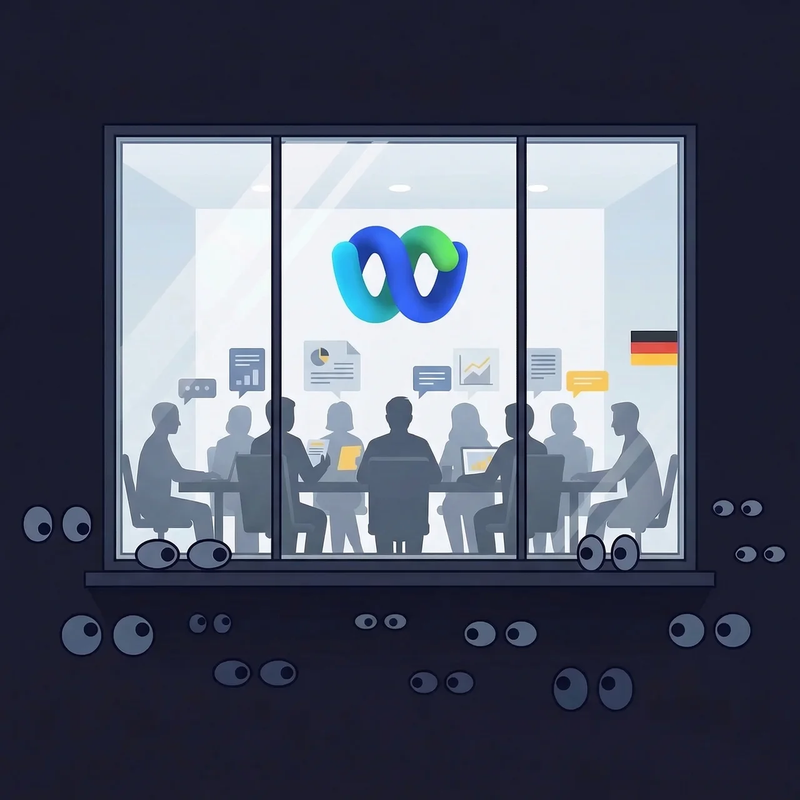
In May 2024, a security researcher discovered that thousands of internal German government Webex meetings were accessible to anyone — including sensitive military discussions — because Cisco left an IDOR vulnerability unpatched in their Frankfurt data centre. In April 2025, a critical remote code execution bug (CVSS 8.8) meant clicking a malicious Webex meeting link could execute arbitrary code on your machine. And users on every review platform describe the same experience: sluggish, resource-heavy, and nearly impossible to cancel.
If you are searching for a Webex alternative — or simply wondering whether the issues with Webex justify the cost — this blog lays out the full comparison. We put Cosmos Video head-to-head against Webex on security, performance benchmarks, features, and pricing, using verifiable data and real user feedback. No listicle, no affiliate links, just the numbers.
Webex's Free Plan Has a 40-Minute Time Limit. Cosmos Doesn't.
Is Webex free? Technically, yes — but with severe restrictions. The Webex free plan caps group meetings at 40 minutes. That is the Webex 40 minute limit, and it puts the free tier on par with Zoom's — hardly a competitive advantage.
Forty minutes is not enough for most real work. A client demo that runs long, a sprint planning session that needs another ten minutes, a candidate interview that is just getting to the important questions — cut short by a countdown timer. You rejoin, re-share the link, and lose the momentum. For a product backed by Cisco's resources, the Webex free plan limitations feel deliberately restrictive rather than genuinely useful.
The free plan also lacks cloud recording — you can only record locally to your own machine. There are no AI meeting summaries, no transcription, and only basic support. To get cloud recording and the AI Assistant, you need the Starter plan at $14.50/user/month.
Cosmos Video's free plan removes the timer entirely. Up to four concurrent users, unlimited call duration, no forced disconnection. Recording with AI-powered summaries is included on the free plan — stored in the cloud for seven days. No local file management, no upgrade wall mid-meeting.
If the Webex 40 minute limit is the reason you started searching for alternatives, Cosmos solves it on day one.
Security: German Government Meetings Exposed
Is Webex secure? The marketing says yes. The incident log tells a different story.
Thousands of Government Meetings Accessible
In May 2024, journalists from Die Zeit discovered that Cisco Webex had an IDOR vulnerability (insecure direct object reference) that allowed anyone to access metadata from internal German government Webex meetings — including the Bundeswehr (German armed forces), the Federal Office for Migration and Refugees, and other sensitive agencies. Meeting topics, participant lists, times, and in some cases personal meeting room links for high-ranking officials were exposed.
The vulnerability was in Cisco's Frankfurt data centre deployment. Cisco did not fully patch it until 28 May 2024, and acknowledged that metadata from meetings scheduled before that date may still be accessible.
This is not a theoretical risk. This was real government data — military planning sessions, immigration discussions — left exposed because of a basic access control failure.
Critical Remote Code Execution — CVE-2025-20236
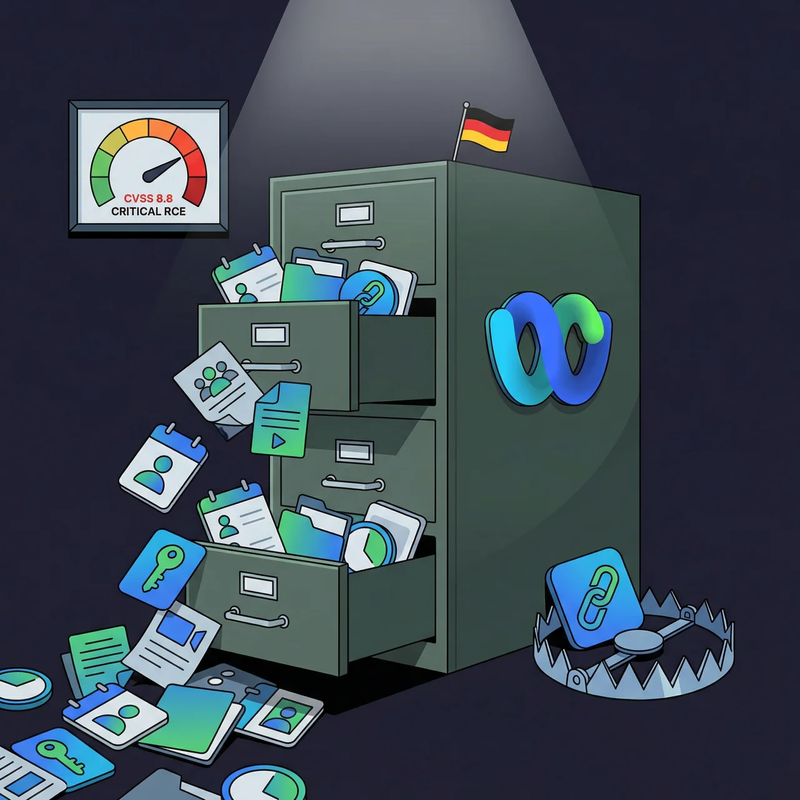
In April 2025, Cisco disclosed CVE-2025-20236, a vulnerability in Webex App's custom URL parser with a CVSS score of 8.8 (High). An attacker could craft a malicious meeting invite link that, when clicked, would download arbitrary files and execute commands on the victim's machine. Versions 44.6 and 44.7 were affected. BleepingComputer reported on the vulnerability, noting its severity.
Clicking a meeting link should not be a security risk. For Webex users on those versions, it was.
How Cosmos Handles Security
Cosmos Video has a fundamentally different risk profile:
Zero known security breaches — no government data exposure, no remote code execution history
SOC 2 Type II certified — independently audited security controls
GDPR compliant — designated DPO, 30-day DSAR response
Never trains AI on user data — your meeting content stays yours
TLS 1.2+ encryption for all data in transit
AES-256 encryption for all data at rest
72-hour breach notification — formal incident management with severity-based escalation
Performance: What Real Users Say and What the Numbers Show
Community Voice
Webex performance problems are a recurring theme across every major review platform. The complaints are remarkably consistent: the application is heavy, meetings lag, and the interface feels like it belongs to a previous decade.
"The interface can feel a bit cluttered and overwhelming at first because there are so many features tucked away in different menus. It also takes a noticeable toll on my laptop's performance; I’ve found that it can be quite a memory hog, especially when I have multiple apps running alongside a heavy video call." — Nataporn C., IT Support, G2 2026
"Webex suite can feel complex to setup and its interface is something viewed as cluttered or less intuitive, leading to a learning curve for new users. Sometimes it feels laggy and mobile app freezes, especially on slower networks. The pricing and licensing confusing or costly for smaller teams." — Kapil S., Project Manager, G2, January 2026
"It can sometimes feel heavy compared to lighter collaboration tools. The interface has a learning curve for new users, and some features are buried under multiple menus, which can slow down quick actions. It also tends to be more resource-intensive, especially on older systems." — Ria P., Software Engineer, G2, January 2026
"The service is frustratingly slow and the interface design feels outdated and difficult to navigate. It's challenging to use because of these issues. The raised hands feature is also not sufficiently visible, which adds to the difficulty." — Anastasiia B. G2
When G2 reviewers giving 4 and 5 stars still feel the need to flag the interface as "cluttered", "complex", and "resource-intensive", there is a systemic problem. These are not power users complaining about edge cases — they are everyday professionals describing their daily experience.
The Real Test: Original Benchmark Data
Before we even got to testing, we hit a wall. During our evaluation, Webex's sign-up page returned a "Something went wrong" error — the page simply would not load. We were unable to create an account or join a call.
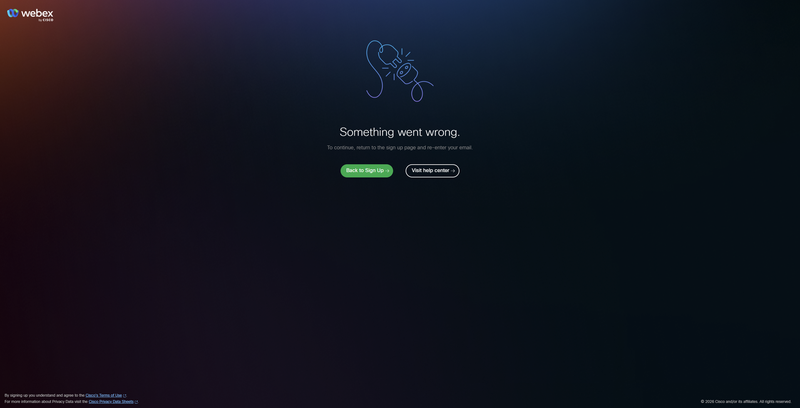
If you search for "is Webex down" or "Webex outage", you will find that Webex down reports spike regularly. For teams that depend on their video platform being available when they need it, this is a serious concern. A meeting tool that cannot be relied upon to load is not a meeting tool — it is a liability.
After a day, we tried again and were able to sign in. Then we measured both platforms under identical conditions to see how they compare when it matters most — during an actual call.
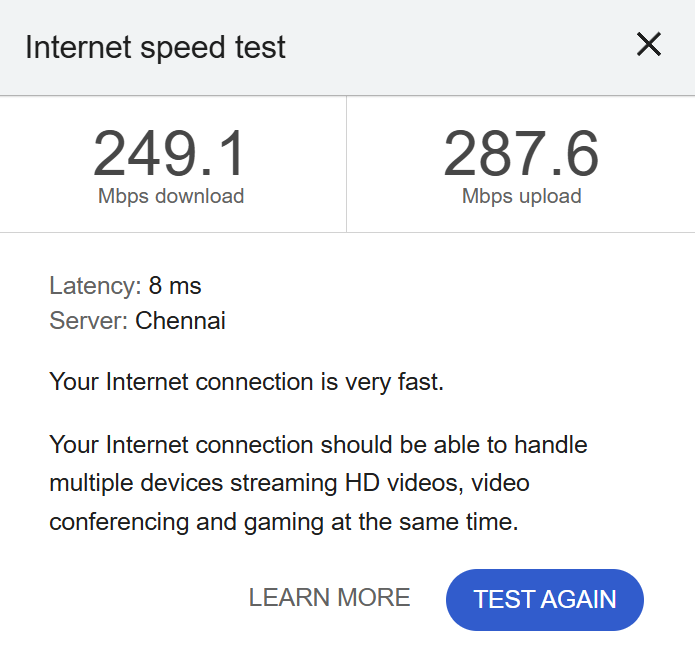
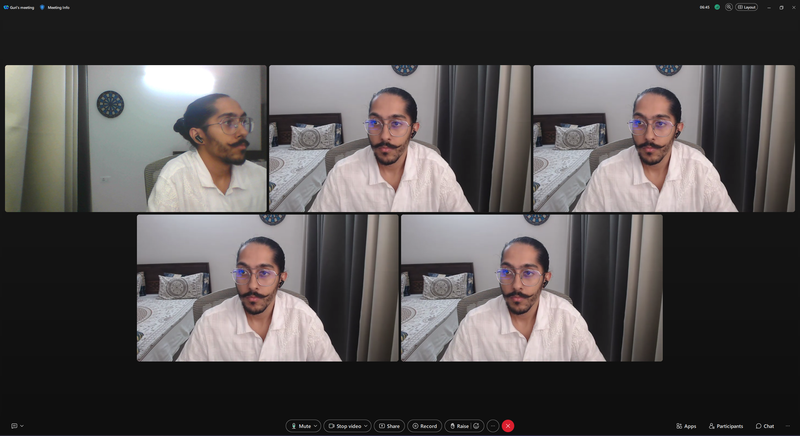
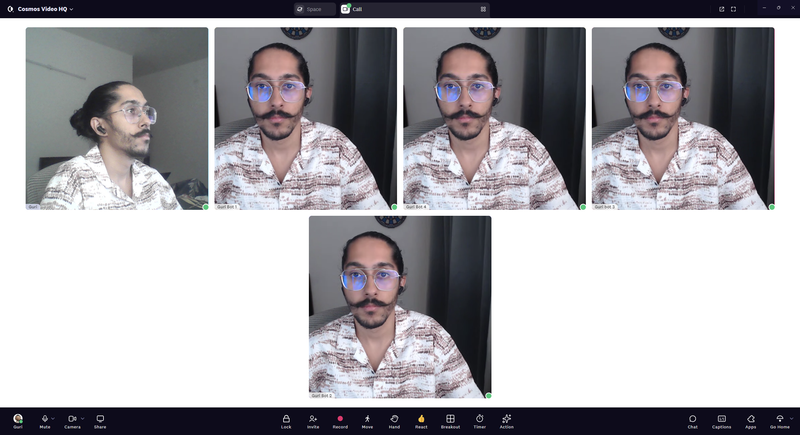
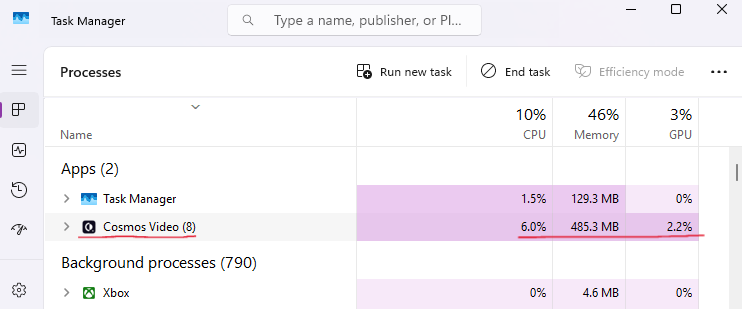
Test conditions: Five-person video call, all cameras on, same hardware, same internet connection, same time of day.
Hardware-

Internet-
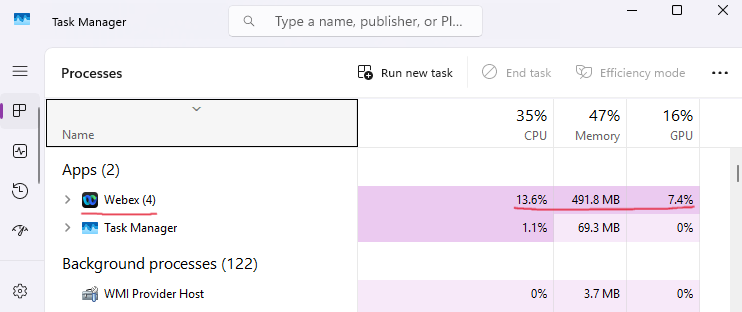
Cisco Webex — 5-Person Call:
Cosmos — 5-Person Call:
Head-to-Head:
The memory figures are close — within 7 MB of each other. But CPU and GPU tell a different story. Webex demands more than double the CPU and over three times the GPU that Cosmos needs for the identical call.
What does that mean day-to-day? If you are running Webex on a laptop whilst juggling a design tool, a spreadsheet, and a dozen browser tabs — the norm for most knowledge workers — that extra CPU and GPU load is the difference between a smooth experience and a sluggish one. Cosmos leaves more headroom for everything else you need open.
The GPU gap is particularly relevant for machines without dedicated graphics hardware. On those devices, GPU work falls back to the CPU, compounding the 56% CPU difference even further.
Features: What Meetings Actually Need
The Baseline
The fundamentals that any professional video conferencing platform must deliver:
Webex checks the standard boxes — it has been doing so for years. The issue is not missing fundamentals but what Cisco charges for them.
Cloud recording and AI summaries require a paid plan starting at $14.50/user/month. On the free tier, you can only record locally — which means the file cannot be shared via link, and has no AI transcript or summary. Cosmos includes cloud recording with AI-powered summaries, transcripts, and clickable timestamps on the free plan with seven-day cloud storage.
Where Cosmos Goes Further
Here is where the platforms diverge meaningfully:
Here is what these differences mean in practice.
Screen Sharing: Webex offers two screen share modes — one optimised for static content (documents, slides) at up to 1080p but only 3–5 frames per second, and another for motion/video at 720p and 30 FPS. The trade-off is stark: sharp resolution or smooth playback, but not both. Cosmos screen sharing goes up to 2880×1620 at 30 FPS — nearly triple Webex's static resolution at six times the frame rate — with three modes to suit different network conditions.
Embedded Apps: Webex supports third-party integrations, but bringing an external tool into a live meeting typically means pre-configuring it through admin settings or falling back to screen share. Cosmos flips this by letting anyone paste a URL directly into the call — a Miro board, a Notion doc, a spreadsheet — and it appears as a live interactive embed that every participant can engage with simultaneously. Zero setup, zero admin involvement.
Room Types: Webex treats every interaction identically: schedule it, join it, end it. There is no concept of a room you leave open, a space you co-work in silently, or an area where proximity determines who you hear. Cosmos was designed around the idea that different types of work require structurally different environments. Meeting Rooms handle scheduled calls. Focus Rooms provide silent co-working spaces for body doubling. Spatial Areas let you move through a space where audio is proximity-based — walk closer and you hear, walk away and the call ends. Personal Rooms enable instant walk-up conversations. And Game Rooms give teams 15 built-in games for breaks and team-building — no third-party setup needed.
Cosmos Is Not Just a Meeting Tool
Webex — like every traditional video conferencing product — operates on a transactional model. Someone creates a meeting, people join, the meeting ends, everyone disperses. The space between meetings is a void filled with Slack pings and calendar holds.
Cosmos replaces that void with a persistent virtual workspace. Instead of scheduling discrete calls, your team occupies a shared digital space throughout the working day. You see at a glance who is around, who is deep in work, and who is free. When you need someone, you click and talk — the connection is live in under 50 milliseconds. No link, no invite, no waiting for someone to accept.
This addresses the core problem with tools like Webex: they are designed for planned communication but offer nothing for the unplanned kind. The quick clarification, the "have you seen this?" moment, the 15-second question that does not warrant its own calendar event — these interactions happen dozens of times a day in a physical office. In a Webex workflow, they either become meetings (too much overhead) or messages (too slow).
Walk-up access changes the rhythm of work.FRONTIER, a VFX studio, measured 60 spontaneous interactions daily across their 30-person Cosmos space. That is 60 moments of collaboration that would have been either scheduled meetings or lost entirely in a Webex-based workflow.
Proximity audio creates natural boundaries. In a Cosmos space, sound behaves spatially — approach someone and you hear them, step away and the call ends. Private side conversations and open group discussions coexist without interference, just as they do in a real office.
True Statuses replace the "are you free?" message. Four purpose-built availability states — Available, Listening, Focus, and Away — give your team reliable signals about who can be interrupted and who cannot. No more guessing, no more accidentally disrupting deep work.
The most common feedback: it feels like an office. Not a meeting tool, not a chat app — a shared environment where the team is visibly present and accessible.
"Cosmos has dramatically enhanced our productivity, culture and engagement. Our employee NPS increased by 20%." — Mike Williams, Production Manager, FRONTIER
"Everyone being available in our Cosmos space created a real sense of community. We go through crunch times much faster compared to back-and-forth messaging." — Keama, Accounting, Reconciled
Pricing: Enterprise Bloat vs Concurrent Simplicity
How Webex's Pricing Works
Webex pricing is structured around per-user, per-month licensing. Here are the current plans:
Source: Webex Official Pricing
The jump from free to Starter is steep — $14.50/user/month, which is more expensive than Zoom's Pro plan ($14.16/user/month annual) and significantly more than Teams Essentials ($4/user/month). And like every per-seat model, you pay for every person on the roster, regardless of how many are actually in meetings simultaneously.
For a 20-person team on the Starter plan, that is $290/month — $3,480/year — before any add-ons for calling, webinars, or events.
How Cosmos Pricing Works
Cosmos bills on a concurrent seat model. The question is not "how many people are on your roster?" but "how many are ever on the platform at the same moment?" Premium is $8.80/month (monthly) or $7.70/month (annual) per concurrent user.
Take a 20-person team spread across Sydney, London, and Toronto. Peak overlap might be 10 people. With Webex, you buy 20 licences regardless. With Cosmos, you buy 10 — because that is the actual simultaneous demand.
The Maths
Even in the worst case — every team member online at once — Cosmos undercuts Webex Starter by nearly 50%. Factor in realistic concurrency and a 50-person team saves over $6,000 annually. And that is comparing against Webex's cheapest paid plan. Against the Business tier at $25/user/month, the gap widens further.
Cosmos Premium also includes everything out of the box: real-time translation, AI meeting summaries, embedded apps, built-in games, spatial audio, and the always-on workspace. No tiers to navigate, no features locked behind higher plans, no sales calls for enterprise pricing.
What Webex Users Switching to Cosmos Experience
Benchmarks and feature grids tell part of the story. The rest comes from teams that left enterprise video platforms behind and never looked back:
"It allows a real-life feel to a virtual experience which fosters a deep sense of connection! It is MORE than what typical video conferencing tools provide — this builds community!" — Shade O., Events Strategist, G2 Review
"It's definitely the best way we've found to work remotely, and it's the closest we've felt to being in person. Clicking on someone to start a conversation is far more natural than constantly sending Zoom links — just like tapping on someone's shoulder at the office!" — Liam M., G2 Review
"My team is remote and geographically spread. Using Cosmos has enabled us to collaborate and stay in touch during the workday. It's great for informal collaboration on projects and provides a central place for the team to meet." — Matthew W., G2 Review
"With Cosmos, we can host meet-ups with colleagues, conduct virtual stand-up meetings, and even indulge in a bit of friendly gossip. It's an effective way to strengthen team bonds on a daily basis." — Patala N., G2 Review
Want to see what the transition looks like in practice? The Cosmos case studies page includes FRONTIER, a VFX studio that reclaimed 45 minutes per employee per day, and Reconciled, a 60-person accounting firm that replaced years of fragmented meeting tools with a single always-on workspace.
FAQ
Is Cosmos a free Webex alternative? Yes. Cosmos has a free plan with unlimited-duration video calls for up to four concurrent users, cloud recording with AI summaries, and seven-day cloud storage. No credit card required, no trial period.
Does Webex have a time limit on free meetings? Yes. The Webex free plan limits group meetings to 40 minutes and caps participants at 100. Cosmos has no time limit on any plan.
Is Cisco Webex secure? Webex has had significant security incidents, including the May 2024 German government meeting exposure and a CVSS 8.8 remote code execution vulnerability in April 2025. Cosmos has zero known security breaches, holds SOC 2 Type II certification, and does not train AI on user data.
Why is Webex so slow? Webex is known to be resource-intensive, particularly on older hardware. Cisco's own documentation acknowledges crash-inducing CPU usage and recommends hardware acceleration as a workaround. In our benchmark, Webex used 56% more CPU and 70% more GPU than Cosmos during the same five-person call.
How much does Webex cost per user? The Starter plan is $14.50/user/month. The Business plan is $25/user/month. Enterprise pricing requires a sales conversation. Cosmos Premium is $7.70/user/month (annual billing) with concurrent pricing — you only pay for who is online at once.
Can Cosmos replace Webex for remote teams? Yes. Cosmos matches Webex on core video conferencing features and goes beyond with a persistent virtual workspace, spatial audio, five room types, embedded apps, built-in games, and always-on team presence. Many organisations use Cosmos as their primary collaboration platform.
Does Cosmos work for large teams? Yes. Cosmos supports up to 200 participants per call and 500 simultaneous users per space on the Enterprise plan. Case studies span teams from 10 to 150+ people across VFX, accounting, education, and marketing.
What is the best Webex alternative for small teams? Cosmos is particularly well-suited for small teams because of its concurrent pricing model. A 10-person team where 5 are online at once pays for 5 concurrent seats — $38.50/month on annual billing. The equivalent Webex Starter cost is $145/month. Cosmos includes features that Webex charges extra for, including cloud recording and AI summaries on the free plan.
Try Cosmos Free
Twenty years of Cisco engineering, and the result is a platform that exposed government meetings, ships critical CVEs quarterly, suffers multi-day outages, and could not even load its own sign-up page when we tried to test it.
Cosmos Video is the opposite of enterprise bloat. Lower resource usage, zero security baggage, concurrent pricing that rewards actual usage, and a free plan that already includes what Webex locks behind $14.50/user/month. Recording, AI summaries, unlimited duration — all from day one.
No time limit. No per-seat trap. No credit card to start.
Comments
Your comment has been submitted