Why Cosmos Is the Best Google Meet Alternative in 2026
Google Meet is a US-based product — and with the growing shift away from American platforms, it is no exception. Governments across Europe are actively dropping it. France banned US video platforms for 2.5 million civil servants. Denmark blocked Google Workspace in schools over GDPR violations. Germany restricted it across multiple states. The concern is not theoretical — it is regulatory.
The reasons go beyond data sovereignty. Google processes your conversations through Gemini AI — whether you asked for it or not. It has no native desktop app, running entirely inside a browser tab with well-documented performance problems. And free group calls cut off at 60 minutes.
If you have been looking for meet alternatives, the case for switching is getting harder to ignore: US-based data storage under the CLOUD Act, AI training on your meeting content, browser-only architecture that drains system resources, and a time limit that interrupts every free group call.
This article compares Google Meet head-to-head with Cosmos Video — the best Google Meet alternatives available today. No time limits on free calls, concurrent pricing instead of per-seat, a native desktop app, and a business model funded entirely by subscriptions. We cover the time limit, data practices, performance, features, and pricing — all backed by verified sources.

The 60-Minute Time Limit
The Google Meet time limit is 60 minutes for group calls of three or more on the free tier. One-on-one calls are unlimited, but the moment a third person joins, the clock starts. The Google Meet time limit has been in place since Google ended its pandemic-era unlimited offering — and it is the most common reason teams start looking for an alternative.
In practice, this means your retrospective or client walkthrough hits a wall at the hour mark. A chime at 55 minutes. A hard disconnect at 60. Everyone scrambles to rejoin through a new link. These Google Meet time limits apply to every group call without exception — the Google Meet time limitation cannot be bypassed. Removing the Google Meet free time limit requires Google Workspace, starting at $7 per user per month. There are no other Google Meet limits on call length for paid users, but the free tier restriction is absolute.
Cosmos Video's free plan has no time limit at all. Up to four people, as long as you need. Cosmos also includes recording with AI summaries on the free plan with seven-day cloud storage. On Google Meet, recording is locked behind Business Standard at $14/user/month. Between the google meet free time limit and paywalled recording, the free tier amounts to more of a trial than a genuine tool.

Data Practices: Where Your Conversations End Up
Is Google Meet secure? Is google meeting safe for your team's conversations? On a technical level, yes — calls are encrypted with DTLS-SRTP in transit, which is standard practice. But whether Google Meet is safe or not depends on more than encryption protocols. It depends on what happens to your data after the call ends.
Here is the concern:
US Data Storage and the CLOUD Act
Google Meet data sits on servers in the United States. Under the US CLOUD Act, American authorities can compel US-based tech companies to hand over data — regardless of where that data is physically stored. This creates a direct legal conflict with GDPR, which is why multiple European governments have taken action.
The Schrems II ruling from the Court of Justice of the EU found that the US does not provide data protection equivalent to what the GDPR guarantees. That ruling invalidated Privacy Shield and raised fundamental questions about any service that routes European data through US infrastructure.
This is not abstract policy. It is why:
France is transitioning 2.5 million civil servants away from US video platforms — including Google Meet, Zoom, and Teams — to a sovereign tool called Visio, built by the French government's digital agency DINUM. No renewal of US platform licences after 2027.
Denmark banned Google Workspace in schools over GDPR violations.
Germany restricted Google Workspace in schools across multiple states — including Baden-Württemberg and Hessen.
The Netherlands mandated compliance conditions for Google Workspace after conducting Data Protection Impact Assessments.
These are regulatory decisions backed by legal findings. Is Google Meet safe enough for organisations that operate under GDPR? That is a question each team has to answer — but the direction of travel across Europe is clear.
Gemini AI — Forced Into Every Plan
In January 2025, Google bundled Gemini AI into all Workspace subscriptions and raised prices by approximately 17%. There is no opt-out. Every Workspace user now pays for Gemini whether they use it or not.
Gemini processes your emails, documents, calendar events, and meeting content to produce summaries and suggestions. What Google does with this data at scale — how it informs future models, products, or targeting strategies — is something their privacy policies do not conclusively address.
Thele v. Google — The Gemini Lawsuit
In November 2025, a class-action lawsuit was filed against Google (Case 5:25-cv-09704) alleging that Google secretly activated Gemini for all users' Gmail, Chat, and Meet accounts around October 2025 — without consent. Google's response: The reports are misleading. The case remains unresolved.
But the existence of a federal class-action over whether an AI silently reads your meetings says something about the state of trust around Google's data practices — and it matters for anyone asking - is Google Meet safe for sensitive work?
How Cosmos Handles Data
Cosmos Video operates on a subscription-only model. There is no advertising arm, no profiling engine, and no AI model trained on your calls. Revenue comes from one source: the people who pay to use the product.
On the technical side, Cosmos encrypts all data in transit with TLS 1.2+ and at rest with AES-256. The platform holds SOC 2 Type II certification — meaning an independent auditor has verified its security controls — and is fully GDPR compliant. Customer call data is not processed for AI training, marketing insights, or any purpose beyond delivering the service.
The google meet security question is ultimately a question about data infrastructure. When the platform behind your video calls stores data on US servers, processes it through AI, and operates under the CLOUD Act, the relationship between your conversations and that legal framework is structural. Cosmos has no US data obligations to navigate, no AI training pipeline to feed, and no reason to treat your meetings as anything other than private.

Performance: The Browser-Only Problem
Google Meet has no native desktop application. Every call runs inside a browser tab — and that is behind most of the performance complaints users report.
When Meet runs in Chrome, your video call shares CPU, memory, and GPU with every other open tab. Your email, your documents, your project management tool — all competing for the same resources. The result is sluggish performance during screen shares, memory consumption that pushes close to a gigabyte, and calls that freeze or disconnect under load.
A native desktop app runs as its own process with dedicated system resources. A browser tab does not. If Chrome becomes unstable, your meeting tab crashes and your call drops. A native app crash does not take your browser session down with it.
Google themselves acknowledge the problem. They maintain a "Fix an overheating laptop" support page for Meet that recommends lowering video quality, turning off your camera, and closing other tabs — essentially telling users to use less of their computer while using Google's product.
What Users Actually Say
"Is it just me or is Google Meet very unreliable? We see people in the same office suddenly go mute. We've upgraded laptops and it hasn't resolved the issue." — Reddit r/sysadmin, March 2025
"Google Meet has caused my laptop to lag terribly. Screen sharing takes ages to begin, and video and audio are never in sync." — Reddit r/OnlineESLTeaching, March 2025
"The audio fully mutes after around 10–15 minutes of being in the call. If I leave and come back, everything is fixed." — Reddit r/techsupport, November 2025
"Laptop slows down and freezes whenever on a Google Meet." — Google Meet Community Forum, 2026
These are not edge cases. Users report Google Meet performance issues across different hardware, browsers, and network conditions. From Google Meet audio issues to Google Meet lag to Google Meet freeze screen mid-presentation — the complaints are consistent. Google Meet slow performance, Google Meet high CPU usage, and Google Meet memory usage spikes are architectural problems that stem from running a video call inside a browser tab. These are persistent Google Meet issues that no amount of tab-closing will fix.
Original Benchmark Data
We ran our own performance test to put numbers behind the complaints.
Hardware-

Internet-
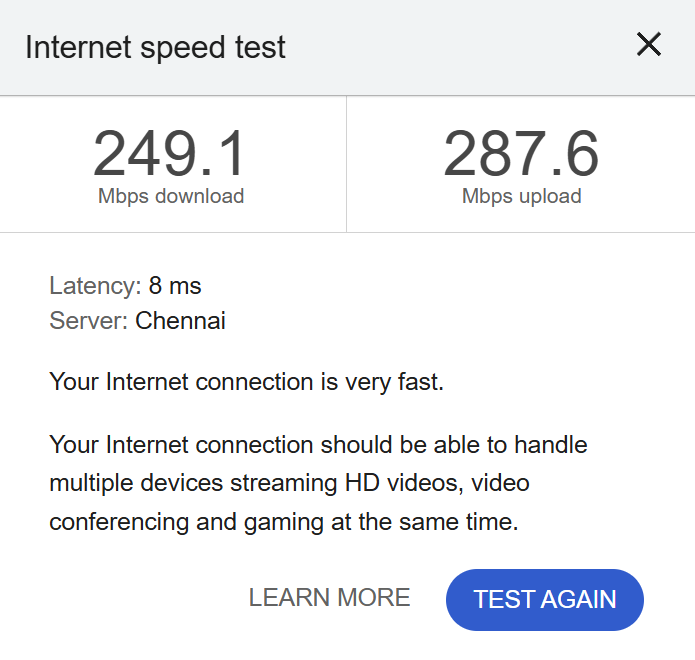
Test conditions: Five-person video call, all cameras on, same hardware, same internet connection, same time of day.
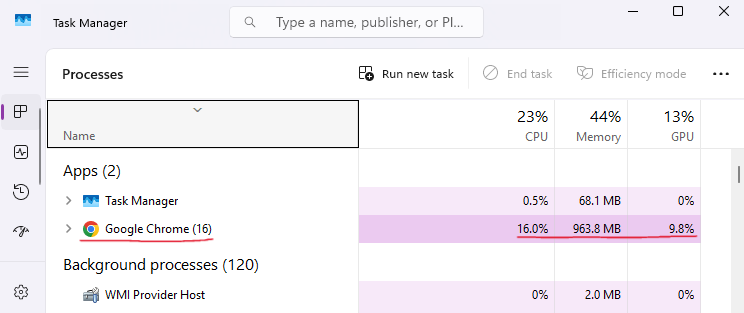
Google Meet — 5-Person Call (Chrome):

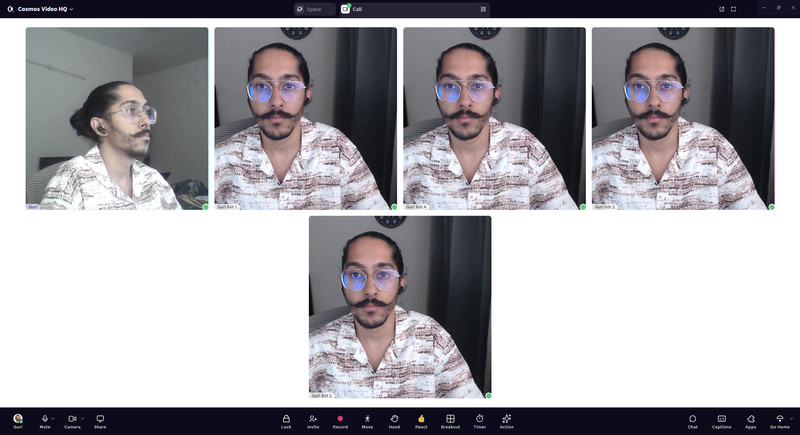
Cosmos — 5-Person Call (Native App):

Head-to-Head:
Google Meet used nearly three times the CPU, double the memory, and four and a half times the GPU for the same five-person call. Google Meet CPU usage of 16% alongside 963.8 MB of RAM — close to a full gigabyte from a single browser tab. On machines with 8 GB of RAM — still common on budget laptops and Chromebooks — that is over 12% of your total system memory taken by one video call.
The GPU difference matters most for laptops without a dedicated graphics card. On those devices, every bit of GPU work falls back onto the CPU — making the real-world performance gap even wider than these numbers suggest.
Because Google Meet has no native app, all of that resource usage sits inside your browser process. Cosmos runs as a standalone application, completely independent of your browser. Close Chrome entirely, and the call keeps going.
Features: Shared Ground and Where Cosmos Pulls Ahead
What Both Platforms Cover
The "paid" markers on Google Meet's column matter. Recording requires Business Standard at $14 per user per month. Breakout rooms require the same tier. AI summaries come via Gemini — now bundled into every plan with the associated 17% price increase. On Cosmos, recording and AI summaries are included on the free plan with seven-day cloud storage.
Where Cosmos Goes Further
Here is why the key differences matter in practice.
No Native App — Missing OS-Level Integration: Beyond the performance cost, the lack of a native desktop app means no system-level integration for notifications, window management, or audio device control. You cannot set per-app volume, you do not get native system alerts when someone joins, and window management is limited to whatever your browser offers. Cosmos runs as a native app with full OS integration on both Mac and Windows.
No Private Messaging: Google Meet's in-call chat is visible to every participant. Need to quietly ask a colleague something? Need to share a sensitive link with your manager without the whole group seeing? "Private chat isn't an option on Google Meet at present." In Cosmos, you can DM anyone during a call.
Recording Fragmentation: When you record a Google Meet call, the outputs scatter: the video file goes to Google Drive, the transcript lands in a separate Google Doc, AI notes attach to the Calendar event, and chat saves as a .SBV file. There is no unified view. In Cosmos, recording, transcript, summary, action items, and clickable timestamps all live on one page. Click any line in the transcript and jump to that exact moment in the video.
Embedded Apps: Google Meet has no way to bring external content into a call. If your team needs to review a Figma mockup or a Notion brief during a meeting, everyone opens it separately. In Cosmos, you paste any URL directly into the call and it loads as a shared view for all participants — no plugins, no setup.
Five Room Types: Meet offers one format: the standard video grid. Cosmos provides five distinct environments. Meeting Rooms handle scheduled calls. Focus Rooms provide silent co-working for body doubling. Spatial Areas use proximity audio — walk towards someone to talk, walk away to leave the conversation. Personal Rooms allow instant walk-to-talk interactions. And Game Rooms come with built-in multiplayer games for team building without third-party tools.
The Google Graveyard — Product Kill Risk: Google has shut down roughly 300 products over the years. In communications alone: Google Talk, Google Wave, Google Buzz, Google+, Hangouts, Allo, Duo, Spaces, and Inbox — nine products in 15 years. Duo was merged into Meet. Hangouts users were forced to migrate. Jamboard was retired in late 2024 with no first-party replacement. When you build your team's communication around a Google product, you are betting this one will be the exception.
Cosmos Is More Than a Meeting Tool

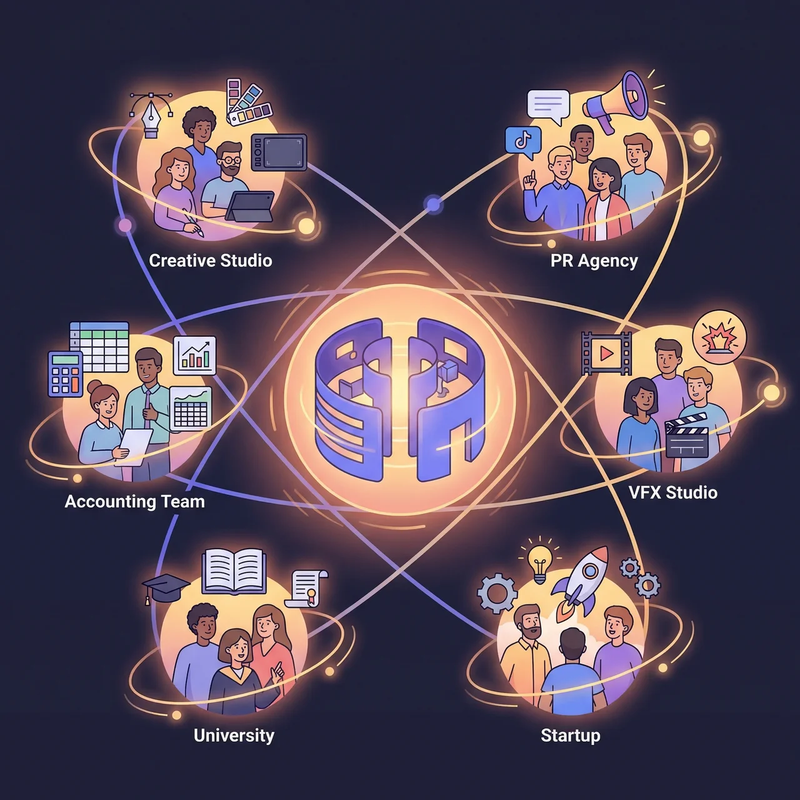
Everything above compares Google Meet and Cosmos as two versions of the same thing — a place to hold video calls. But that framing only tells half the story. Cosmos is a virtual workspace: an always-on environment where your team stays connected throughout the working day.
Google Meet is built around calendar invites. Someone books a slot, everyone clicks a link at the appointed time, the call happens, and then everyone scatters. Between calls, there is no shared presence. You have no way of knowing whether a colleague is at their desk, in another meeting, or offline entirely.
Cosmos replaces that model with a persistent digital space — a visual representation of your team that stays open all day. Avatars show who is online, who is in a conversation, and who is heads-down. When you need a quick answer, you walk over and talk — connection time is under 50 milliseconds. No link, no invite, no waiting.
The two-minute question no longer costs thirty minutes. Remote teams lose hours every week to meetings that exist only because there is no lighter way to communicate. In a Cosmos space, FRONTIER's 30-person team averages 60 spontaneous interactions per day — the kind of quick exchanges that vanish entirely on a tool like Meet.
Spatial audio creates natural separation. Proximity-based audio means conversations stay local. Walk closer to a group and you hear them; step away and the call ends. Two discussions can run in the same space without interfering — just as they would in different corners of a physical office.
True Statuses remove the guesswork. Four states — Available, Listening, Focus, and Away — tell your team exactly when you can be approached and when you cannot. Deep work stays uninterrupted. Quick questions reach the right person at the right time.
A workplace, not a window. The difference teams notice most is not any single feature — it is the feeling of working alongside people again. Cosmos is not an app you open for a call and close afterwards. It is the room your team sits in.
"Cosmos has dramatically enhanced our productivity, culture and engagement. Our employee NPS increased by 20%." — Mike Williams, Production Manager, FRONTIER
"Everyone being available in our Cosmos space created a real sense of community. We go through crunch times much faster compared to back-and-forth messaging." — Keama, Accounting, Reconciled
Pricing: Per-Seat vs Concurrent — The Maths
Google Meet Pricing
Google Meet is bundled into Google Workspace. Google Meet free usage comes with the limitations covered above: 60-minute group calls, no recording, and no breakout rooms. To unlock the features, most teams actually need to move to a paid plan.
Here is what the Google Meet pricing plans look like in 2026:
Google Workspace uses per-seat licensing. Every person in your organisation needs their own licence, regardless of how many are in meetings at the same time. Since January 2025, every licence also includes Gemini AI — no opt-out, and an associated 17% price increase.
Google Workspace does include email, calendar, and Drive alongside Meet. But if your team already uses other tools for email and documents — or if you only need video conferencing — you are paying for an entire suite to access the meeting features.
How Cosmos Pricing Works
Cosmos does not charge per seat. It uses a concurrent pricing model: you pay based on the peak number of people online at the same time, not the total headcount. Premium costs $8.80 per concurrent user monthly, or $7.70 on an annual plan.
The practical difference is significant. A 20-person company spread across London and Thailand rarely has more than 10 people online at once. With Google, you buy 20 licences. With Cosmos, you buy 10.
Side-by-Side Cost Comparison
Against Google Workspace Business Standard (the minimum tier that unlocks recording and breakout rooms):
Monthly billing:
Annual billing:
A 20-person team with 10 concurrent users on annual billing pays $77 per month with Cosmos versus $280 per month with Google Workspace Business Standard — saving over $2,400 per year.
Cosmos also includes recording and AI summaries on the free plan. Google Meet locks recording behind the $14/user/month tier. For teams that only need video conferencing with recording — and not the full Workspace suite — the cost difference is stark.
What Customers Say About Cosmos
"It allows a real-life feel to a virtual experience which fosters a deep sense of connection! It is MORE than what typical video conferencing tools provide — this builds community!" — Shade O., Events Strategist, G2 Review
"It's definitely the best way we've found to work remotely, and it's the closest we've felt to being in person. Clicking on someone to start a conversation is far more natural than constantly sending meeting links — just like tapping on someone's shoulder at the office!" — Liam M., G2 Review
"My team is remote and geographically spread. Using Cosmos has enabled us to collaborate and stay in touch during the workday. It's great for informal collaboration on projects and provides a central place for the team to meet." — Matthew W., G2 Review
"With Cosmos, we can host meet-ups with colleagues, conduct virtual stand-up meetings, and even indulge in a bit of friendly gossip. It's an effective way to strengthen team bonds on a daily basis." — Patala N., G2 Review
More stories from teams that have switched are on the Cosmos case studies page. FRONTIER cut 45 minutes of wasted time per person per day after moving to Cosmos. Reconciled, a 60-person accounting firm, reported stronger team bonds and faster project turnarounds after replacing their previous video tool with a persistent Cosmos workspace.
FAQ
Is Cosmos a free Google Meet alternative? Yes. The free tier includes video calls for up to four people with no time limit, plus recording and AI summaries with seven-day cloud storage. No credit card required.
Does Google Meet have a time limit? Yes — 60 minutes for free group calls of three or more, then automatic disconnection. One-on-one calls are unlimited on both free and paid tiers. Does Google Meet have any time limit on paid plans? No. Workspace subscriptions remove the Google Meet call duration limit entirely, starting at $7 per user per month.
Is Google Meets free? The platform itself is free. The issue is what the free tier actually gives you: a 60-minute group cap, no recording, no breakout rooms, and no admin controls. Is Google Meet free enough for real work? Most teams hit those Google Meet limitations within initial usage. Cosmos covers all of them on the free plan — no time limit, recording included, no credit card required.
Is Google Meet safe? Calls are encrypted in transit with DTLS-SRTP, which is standard. The broader concern when asking is Google Meet safe is US data jurisdiction and AI processing. A class-action lawsuit filed in November 2025 (Thele v. Google) alleges that Gemini AI was activated on user accounts to process private communications without consent. The case is unresolved.
How much cheaper is Cosmos than Google Meet? A 20-person team with 10 concurrent users pays $77 per month on Cosmos (annual billing) versus $280 per month on Google Workspace Business Standard — saving over $2,400 annually. Cosmos also includes recording on the free plan; Google Meet requires the $14/user/month tier for the same feature.
Can Cosmos replace Google Meet for remote teams? Yes. Cosmos covers HD video, screen sharing, recording, reactions, breakout rooms, and chat. Beyond that, it adds a persistent virtual workspace with spatial audio, five room types, and always-on team presence — features that tool like Meet cannot offer.
Does Google Meet have a desktop app? No. Google Meet runs entirely in the browser. The installable PWA option is still Chrome underneath — same rendering engine, same resource profile, same performance constraints. Cosmos has a native desktop app for both Mac and Windows, running as a standalone process with dedicated system resources.
Does Google Meet support private messaging during calls? No. All in-call chat messages are visible to every participant. Cosmos supports direct messages to individual participants during a call.
Where do Google Meet recordings go? The video lands in Google Drive, the transcript in a separate Google Doc, AI notes attach to the Calendar event, and chat exports as a .SBV file. Cosmos puts everything — recording, transcript, summary, and action items — on a single page.
Why are European governments moving away from Google Meet? The core issue is the legal conflict between the US CLOUD Act and GDPR. The EU's Schrems II ruling found that US data protection is not equivalent to European standards. France launched its own sovereign video platform (Visio) in January 2026, and multiple EU member states have restricted US platforms in government and education. Sovereign cloud investment in Europe is projected to reach $80 billion in 2026.
Try Cosmos Free
Every limitation covered in this article — the 60-minute cap, the browser-only architecture, US-based data storage, per-seat pricing, paywalled recording, and AI processing you did not ask for — points to the same underlying issue: Google Meet was not designed as a standalone product for remote teams. It was designed as one feature inside a broader productivity suite.
Cosmos Video was built from the ground up for the way remote teams actually work. Native app. No time limits. Concurrent pricing. 4K screen sharing. GDPR compliant, with no AI training on your data. And a persistent workspace that keeps your team connected between calls — not just during them.
Free to start. No time limit. No credit card required.
Comments
Your comment has been submitted