Why Cosmos Is the Best Microsoft Teams Alternative in 2026
If you are still relying on Microsoft Teams in 2026, you are paying more than you think for a tool that eats your RAM, gets hacked by nation-state actors, and gates basic features behind add-on after add-on.
Teams has been exploited by Russian intelligence services for credential theft. Check Point found four critical vulnerabilities — including the ability to silently edit other people's messages — that sat unfixed for 19 months. Microsoft itself admitted Teams consumes excessive RAM whilst doing nothing. And the EU charged Microsoft with "abusive" bundling of Teams with Office, forcing them to sell it separately worldwide.
The search for alternatives to Microsoft Teams has never been higher. And if you have been putting off looking for a better option, the data below should change your mind.
Most "Teams alternative" articles rank ten tools and call it a day. This one does not. We go deep on a single comparison — Microsoft Teams vs Cosmos Video — covering security incidents, original benchmark data, feature-by-feature breakdowns, and the true cost once add-ons are factored in. Cosmos is a video-first virtual workspace with no time limits, concurrent pricing, and zero security baggage.

Teams' Free Plan Has a 60-Minute Time Limit. Cosmos Doesn't.
Does Microsoft Teams have a time limit? Yes. Group calls with three or more participants on the free plan are capped at 60 minutes. That is the Teams free meeting time limit, and for a tool backed by one of the wealthiest companies on the planet, it is remarkably stingy.
Your team is deep into a sprint retrospective, a client is mid-sentence explaining their requirements, a candidate is halfway through answering your final interview question — and the call drops. Everyone has to rejoin. The momentum is gone.
And the 60-minute cap is just the start. Teams free strips out recording, breakout rooms, live captions, AI features, and gives you a measly 5 GB of storage. The participant cap is 100, compared to 300 on paid plans. To unlock any of these, you are looking at $4–$12.50/user/month before add-ons even enter the picture.
Cosmos Video's free plan does not impose a time limit. Four concurrent users, unlimited duration. No countdown. No forced disconnection. If you need a free Microsoft Teams alternative without a time limit, this is the simplest answer.
Cosmos also includes recording with AI summaries on the free plan — recordings stored in the cloud for seven days. On Teams free, there is no recording at all. You cannot even capture a meeting unless you are paying.
If your baseline requirement is a video call that does not boot you after an hour and lets you go back and watch what was discussed, Cosmos has Teams beat before you even get to features.

Security: Nation-State Hackers Use Teams as Their Weapon of Choice
Is Microsoft Teams secure? Is Microsoft Teams safe? If you look at the actual record — Microsoft's own security disclosures, independent security research, and publicly documented nation-state campaigns — the answer is deeply concerning. Teams is not just a tool with occasional bugs. It is actively used as an attack vector by some of the most sophisticated threat actors on the planet.
Russian Intelligence Services Target Teams Directly
Midnight Blizzard (Russia / SVR) — 2023-2024: The Russian state-sponsored group Midnight Blizzard (linked to Russia's Foreign Intelligence Service SVR — the same group behind the SolarWinds attack) used Microsoft Teams as a social engineering weapon. They sent credential theft phishing lures via Teams chats to target organisations. In a separate campaign, they compromised a legacy Microsoft test tenant via password spray and accessed senior Microsoft leadership email accounts — including cybersecurity, legal, and executive teams. Microsoft confirmed the breach on 19 January 2024.
Storm-2372 (Russia) — 2024-ongoing: A Russian-linked threat actor has been sending fake Teams meeting invitations since August 2024, targeting government agencies, NGOs, defence contractors, and critical infrastructure across Europe, North America, Africa, and the Middle East.
Storm-0324 — Ransomware via Teams: This group used a tool called TeamsPhisher to send phishing lures through Teams, delivering JSSloader malware for ransomware operator Sangria Tempest. Attackers impersonated IT personnel via Teams and convinced users to grant remote access.
Four Critical Vulnerabilities — Open for 19 Months
In March 2024, Check Point Research disclosed four critical vulnerabilities in Microsoft Teams that allowed attackers to impersonate executives in video and audio calls, edit messages without the "edited" label appearing, spoof notifications to make them appear from another sender, and forge caller identity during calls. These vulnerabilities were not fully patched until October 2025 — leaving Teams users exposed for 19 months.

How Cosmos Handles Security
Zero security breaches — no nation-state targeting, no known attack vector
SOC 2 Type II certified — independently audited security controls
GDPR compliant — designated DPO, 30-day DSAR response
Never trains AI on user data — your calls and content stay yours
TLS 1.2+ encryption for all data in transit
AES-256 encryption for all data at rest
72-hour breach notification — formal incident management with severity-based escalation
Teams is a high-value target because of its deep integration into corporate environments. Cosmos is a dedicated meeting and workspace tool — not a sprawling ecosystem that nation-state hackers treat as their favourite attack surface.
Performance: What Real Users Say and What the Numbers Show
Community Voice
Microsoft Teams issues are not niche complaints — they are among the most frequently raised problems across every review platform and developer forum. The pattern is consistent: Microsoft Teams lag, Microsoft Teams buggy interfaces, excessive resource consumption, and outright crashing.
In November 2025, Microsoft acknowledged in the Microsoft 365 Admin Center that Teams is sluggish, particularly when in a call. Windows Latest reported that Microsoft admitted Teams consumes excessive RAM whilst idle and performs poorly during startup. Their proposed fix? Creating a separate executable (ms-teams_modulehost.exe) to handle calling features independently. Splitting the bloat into two processes does not fix the bloat.
And it is not just sluggishness. Search "is Microsoft Teams down" on any given weekday and you will find fresh reports. Microsoft Teams outage news is practically a recurring headline, with Microsoft Teams outage today trending on social media and Downdetector with clockwork regularity.
Microsoft Q&A forums are filled with threads titled "Why do I have very low performance when using Teams?", "Microsoft Teams making PC unresponsive", and "Teams is consuming UNREASONABLY high memory".
Teams is built on WebView2 — a Chromium-based framework that runs web technologies as a desktop application. Many modern apps use Chromium-based frameworks, but Teams' problem is poor optimisation on top of that architecture. The sheer number of features, services, and background processes crammed into the app results in extreme resource consumption even when idle.
"Slow, unreliable, unpredictable, too much functionality added." — Jasper Defescho, Trustpilot, February 2026 (1-star)
"Sometimes it just wont load on any of my devices all day." — Finn Nichols, Trustpilot, February 2026 (1-star)
"Buggy, loading takes forever. UX/UI more complicated than it should be." — Przemyslaw Szczuny, Trustpilot, January 2026 (1-star)
"It glitches a lot. The overall working of Teams isn't very smooth, and the software lags many times. It also often doesn't notify me about messages. Despite being logged in, it randomly logs me out, which is pretty annoying. Another major issue is the video and audio glitches." — Saloni G., G2, February 2026
When users go out of their way to post about performance problems — on Trustpilot, G2, Microsoft's own community forums — that is not idle whinging. These are professionals losing productive hours to an application that should be making their work easier, not harder.
The Real Test: Original Benchmark Data
Community complaints are one thing — hard numbers are another. We set up a controlled benchmark to measure exactly how much system resource each platform consumes under identical conditions.
Hardware-

Internet-
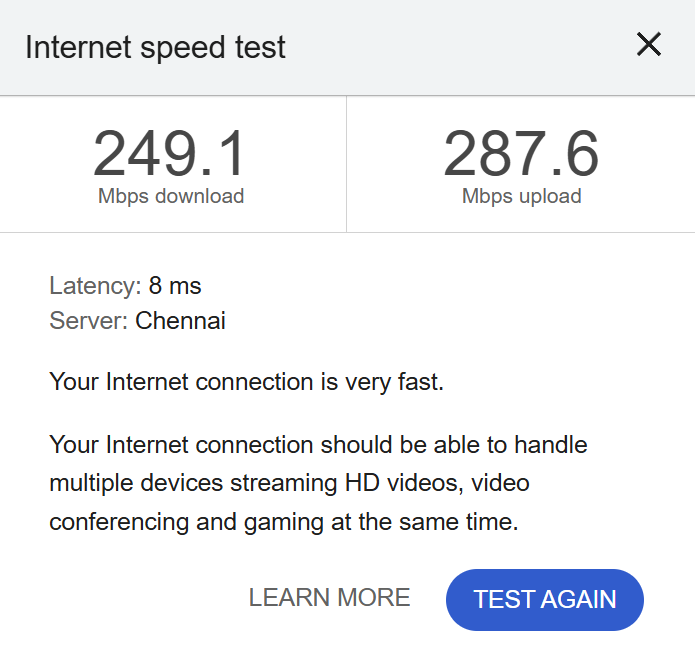
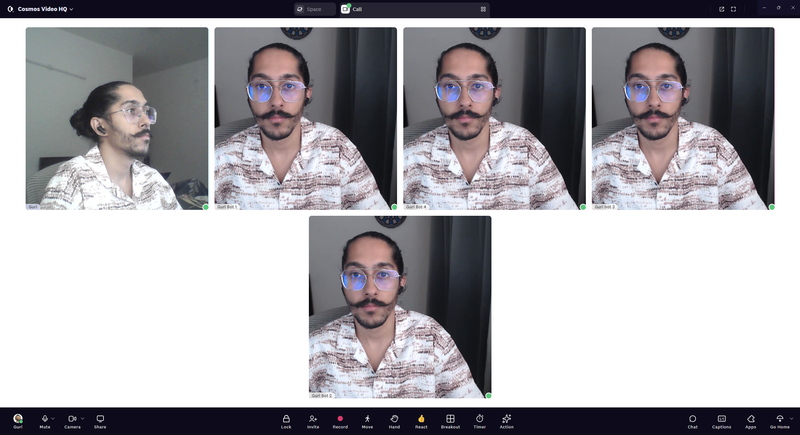
Test conditions: Five-person video call, all cameras on, same hardware, same internet connection, same time of day.
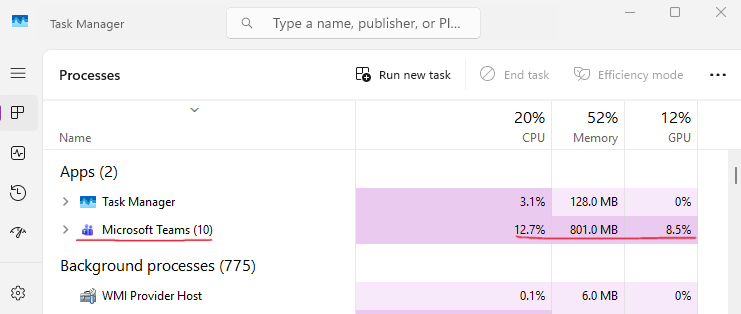
Microsoft Teams — 5-Person Call:

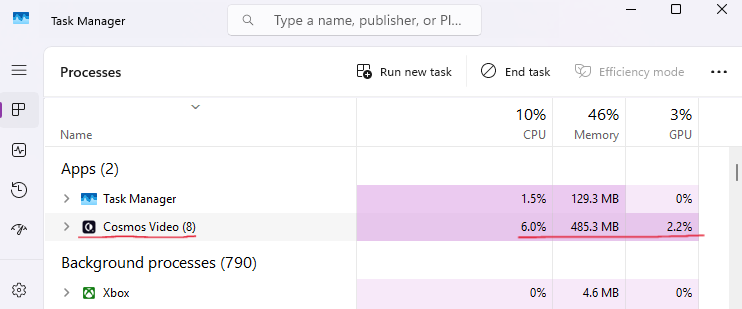
Cosmos — 5-Person Call:
Head-to-Head:
The GPU difference is the headline: Teams uses nearly four times more GPU than Cosmos for the same five-person call. Memory tells a similar story — Teams consumed 801 MB during the call, which says everything about how poorly optimised this application is.
In practical terms, Teams is the reason your laptop fans are screaming during a simple stand-up. It is the reason your machine feels sluggish when you try to open a spreadsheet while on a call. Cosmos consumes a fraction of those resources, leaving your hardware free to actually run the other tools you need open during work.
There is a further wrinkle: a significant proportion of corporate laptops — particularly thin-and-lights and budget machines issued by IT departments — have no dedicated GPU. On those devices, every GPU task falls back onto the CPU. That 8.5% GPU demand from Teams becomes an additional CPU load on top of the 12.7% already measured. The performance gap between Teams and Cosmos widens considerably on the exact hardware most office workers are issued.
Features: What Meetings Actually Need
The Baseline
First, the table stakes — the features any serious video conferencing platform must deliver as standard:
On paper, both platforms tick the same boxes. Teams is a capable meeting tool at the baseline level — nobody disputes that.
The catch is what Microsoft locks behind paywalls. Recording, breakout rooms, and AI meeting recaps are all absent from the free plan. Want the AI-powered Intelligent Recap? That requires Teams Premium at $10/user/month — on top of whatever base plan you are already paying for. Cosmos ships recording and AI summaries on the free tier with seven-day cloud storage. No add-on required, no upgrade prompt mid-meeting.
Where Cosmos Goes Further
Here is where the gap between the two platforms becomes significant:
Here is what each of these differences means in practice.
Embedded Apps: Teams has a sidebar "Apps" panel, but it is not the same as genuine in-call collaboration. If your designer needs to walk the team through a Figma board, the only real option is screen share — one person controls the screen, everyone else watches. In Cosmos, you paste any URL into the call and it opens as an interactive embed for every participant. A Google Doc, a Miro board, a Notion page — everyone sees it, everyone can interact with it, no installation or marketplace required.
Screen Sharing: Microsoft Teams screen sharing limits you to one person sharing at a time. You cannot have two people present side by side or compare documents in parallel. The default frame rate is optimised for static documents, not video or dynamic content. Users on Microsoft's own forums report blurry screen sharing, screen share drops mid-meeting, and screen sharing failing entirely. Cosmos screen sharing goes up to 2880×1620 — nearly double Teams' resolution — with three modes optimised for different scenarios, and multiple people can share simultaneously.
Video Quality: Microsoft Teams video quality defaults to 720p across all packages. If you want 1080p for town halls, you need Teams Premium — the $10/user/month add-on. Users report blurry camera quality on the desktop app, even with good cameras and bandwidth. Cosmos delivers HD 1080p on paid plans using the AV1 codec — a modern video codec from 2018 that delivers crisper video at lower bitrates.
Recording: Teams recordings are stored in OneDrive or SharePoint, consuming your cloud storage quota. A one-hour recording is approximately 400 MB. Recordings have a default expiration of 120 days — after that, they are automatically deleted. For teams in finance, healthcare, or legal, this is a compliance disaster. And the AI meeting recap requires Teams Premium ($10/user/month). Cosmos includes Cosmos Replay on all plans — recording, AI transcript, summary, action items, and clickable timestamps on one page. No OneDrive dependency. No expiration on paid plans.
Live Captions and Translation: Live captions (same language, no translation) are available on Business Basic and above in 30+ languages. Teams Essentials ($4/user/month) is limited to English-only captions. The free plan has no live captions at all. If you need translated captions, you need Teams Premium ($10/user/month) or Copilot ($18/user/month) — and even then, translation has some delay. Cosmos includes real-time translation on paid plans. Each participant independently selects their preferred language.
Room Types: Every Teams interaction follows the same format: someone schedules a meeting, participants join, the meeting ends. There is no structural variety. Cosmos offers five distinct room types, each designed for a different working mode — scheduled Meeting Rooms, silent Focus Rooms for co-working and body doubling, Spatial Areas where proximity controls who you hear, Personal Rooms for instant walk-up conversations, and Game Rooms with 15 built-in team games. A single meeting format cannot accommodate all the ways a team actually communicates during a working day.
Cosmos Is Not Just a Meeting Tool
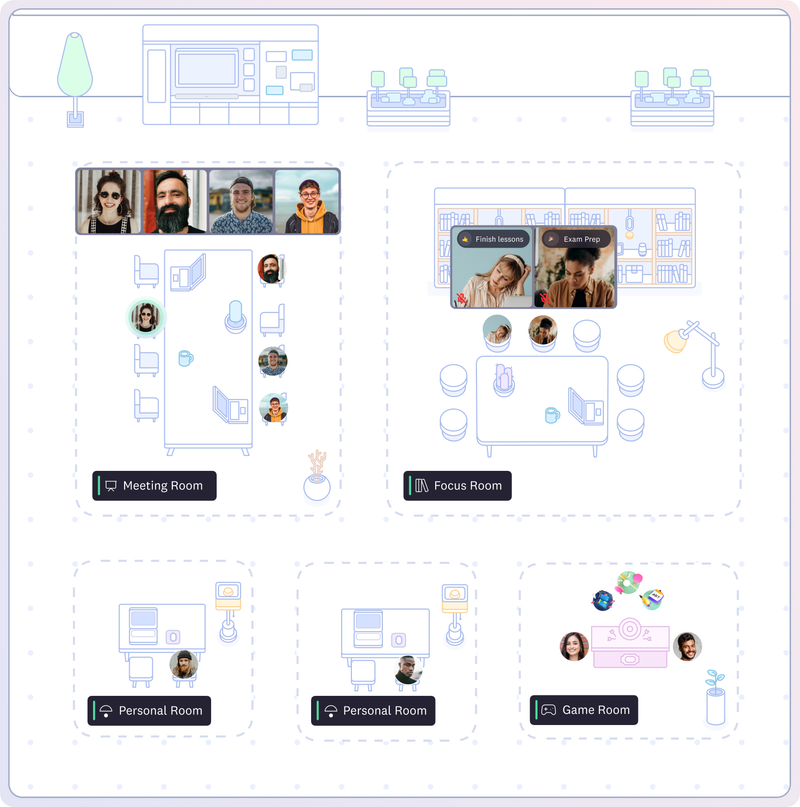
Everything above evaluates Cosmos against Teams on meeting functionality. But reducing Cosmos to a meeting tool misses the point entirely. Cosmos is a virtual workspace — an always-on environment where your team exists together throughout the working day.
Teams tries to solve remote collaboration with two primitives: scheduled meetings and asynchronous chat. Between those two modes, there is a dead zone. You cannot see who is around. You cannot tell if someone is deep in focus work or free for a quick word. The gap between "send a message and hope they reply" and "book a 30-minute meeting for a 30-second question" is where remote teams lose cohesion.
Cosmos fills that gap. Your team occupies a persistent digital space — a shared environment you can see at a glance. Who is online, who is in a call, who is heads-down, who is free. Need a quick answer? Click on someone's avatar and you are talking in under 50 milliseconds. No calendar invite, no meeting link, no waiting for a reply.
This fundamentally changes how remote teams operate:
The quick-question bottleneck disappears. In a physical office, you lean over and ask. In Teams, you type a message and wait — or schedule a meeting that takes longer to set up than the conversation itself. Cosmos restores that instant access. One customer reported 60 spontaneous interactions per day across a 30-person team — the kind of organic collaboration that chat and scheduled calls simply cannot replicate.
Proximity audio makes space meaningful. Cosmos uses spatial audio — walk closer to a colleague and you hear them, move away and the sound fades. Two people can have a private conversation in one part of the space whilst a group discussion happens in another. It mirrors how offices actually work, not how meeting software forces you to work.
True Statuses replace the guessing game. Teams has status indicators, but they are notoriously unreliable — "Available" when someone is clearly in a meeting, "Away" when they are typing. Cosmos has four purpose-built states: Available, Listening, Focus, and Away. Your team knows at a glance when someone can be approached and when they should not be disturbed.
It feels like being in the same room. That is not marketing copy — it is the most consistent feedback from Cosmos customers. The sense of shared presence, of knowing your team is right there, changes remote work from a series of disconnected calls into something that actually feels like working together.
"Cosmos has dramatically enhanced our productivity, culture and engagement. Our employee NPS increased by 20%." — Mike Williams, Production Manager, FRONTIER
"Everyone being available in our Cosmos space created a real sense of community. We go through crunch times much faster compared to back-and-forth messaging." — Keama, Accounting, Reconciled
Pricing: The Add-On Trap vs Concurrent Pricing
How Teams' Pricing Actually Works
If you have ever searched for Microsoft Teams pricing, you have seen the headline numbers. But Teams pricing is not straightforward — the EU charged Microsoft with "abusive" bundling of Teams with Office in 2024, and in September 2025, the EU accepted Microsoft's proposal to separate Teams from Office 365 globally. New business customers must now buy Teams as a separate item. Source: Microsoft Official Pricing Page
On the surface, $4–$12.50/user/month sounds reasonable. But here is the catch: the features that most teams actually need are locked behind add-ons.
For a team of 10 wanting video calling, translated captions, and AI meeting recap— not unreasonable requirements for a modern remote team — the maths looks like this:
And Microsoft has announced a commercial pricing increase effective 1 July 2026.
How Cosmos Pricing Works
Cosmos uses a concurrent seat model. Instead of billing for every person on your roster, you pay based on the maximum number of people online at the same time. Premium is $8.80/month (monthly billing) or $7.70/month (annual billing) per concurrent user.
Consider a 20-person team distributed across London and Thailand. At any given moment, perhaps 10 are online simultaneously — the rest are asleep, offline, or in a different part of their day. With Teams, you pay for all 20. With Cosmos, you pay for the 10 who are actually using the platform.
The Maths
Teams Essentials is cheaper at $4/user/month — but you get English-only captions, no translated captions, no AI recap, and no Office apps. The moment you need translated captions and AI recap, you need Business Basic + Premium = $16/user/month. Cosmos includes real-time translation, AI recap, games, embedded apps, always-on workspace, and spatial audio at $7.70/user/month — less than half the price.
Concurrent pricing savings:
Even if your entire team is online simultaneously — the absolute worst case — Cosmos still costs less. The savings compound as team size grows: a 50-person organisation with 25 concurrent users keeps over $7,000 in the budget annually. The larger the team, the more the concurrent model works in your favour.
What Teams Switching to Cosmos Actually Experience
We have made plenty of claims in this blog. Here is what actual customers say on G2:
"It allows a real-life feel to a virtual experience which fosters a deep sense of connection! It is MORE than what typical video conferencing tools provide — this builds community!" — Shade O., Events Strategist, G2 Review
"It's definitely the best way we've found to work remotely, and it's the closest we've felt to being in person. Clicking on someone to start a conversation is far more natural than constantly sending Zoom links — just like tapping on someone's shoulder at the office!" — Liam M., G2 Review
"My team is remote and geographically spread. Using Cosmos has enabled us to collaborate and stay in touch during the workday. It's great for informal collaboration on projects and provides a central place for the team to meet." — Matthew W., G2 Review
"With Cosmos, we can host meet-ups with colleagues, conduct virtual stand-up meetings, and even indulge in a bit of friendly gossip. It's an effective way to strengthen team bonds on a daily basis." — Patala N., G2 Review
For longer-form stories, see the Cosmos case studies page — including FRONTIER, a VFX studio that saved 45 minutes per employee daily, and Reconciled, a 60-person accounting firm that rebuilt team cohesion after years of isolation on traditional meeting tools.
FAQ
Is Cosmos a free Microsoft Teams alternative? Yes. Cosmos offers a free tier with unlimited-duration video calls for up to four concurrent users, built-in recording with AI summaries, and seven-day cloud storage. No credit card, no trial expiry.
Does Microsoft Teams have a time limit on free calls? Yes. Group meetings on the free plan are capped at 60 minutes, with a 100-participant limit. Cosmos imposes no time restriction on any plan — free or paid.
Is Microsoft Teams secure? Teams has been directly targeted by Russian intelligence (Midnight Blizzard/SVR) for credential theft phishing via Teams chats. Check Point Research disclosed four critical vulnerabilities — including silent message editing and caller identity forgery — that remained unpatched for 19 months. So it is not secure.
How much does Microsoft Teams actually cost? Base plans range from $4 to $12.50/user/month, but the features most teams need — translated captions, AI meeting recap, E2E encryption — are locked behind Teams Premium ($10/user/month extra). Cosmos Premium costs $7.70/user/month (annual) with every feature included, plus concurrent pricing, which means you only pay for who is online at once.
Can Cosmos replace Microsoft Teams for remote teams? Yes. Cosmos matches Teams on core meeting features — HD video, screen sharing, recording, reactions, breakout rooms, chat — and goes further with a persistent virtual workspace, spatial audio, five room types, embedded apps, and always-on team presence. Many organisations use Cosmos as their primary collaboration platform, reducing or eliminating their reliance on both Teams and Slack.
Does Cosmos work for large teams? Yes. Cosmos handles up to 200 participants per call and 500 simultaneous users per space on the Enterprise plan. Published case studies cover teams ranging from 10 to 150+ across VFX, accounting, education, and marketing.
Are there good Microsoft Teams alternatives for business? Yes. Cosmos is purpose-built for remote and hybrid teams. It combines a persistent virtual workspace with concurrent pricing that scales to actual usage, enterprise-grade security (SOC 2 Type II, GDPR compliant), and none of the add-on pricing complexity that makes Teams budgeting unpredictable.
Try Cosmos Free
The case against Teams is not theoretical. Nation-state exploits, 19-month unpatched vulnerabilities, 801 MB in a five-person call, and a pricing model that nickels-and-dimes you for features that should be standard. Whether you are searching for an MS Teams alternative or ready to uninstall Microsoft Teams entirely, the data supports making the switch.
Cosmos Video replaces all of that with a lighter, more secure platform — plus a persistent virtual workspace, concurrent pricing, real-time translation, embedded apps, built-in games, and unlimited free calls. No add-on maze. No ecosystem lock-in. No 60-minute cutoff.
Free to start. No time cap. No credit card.
Comments
Your comment has been submitted