Why Cosmos Is the Best Zoho Meeting Alternative in 2026
Zoho Meeting is the kind of tool that technically works — and that is the best thing you can say about it. The video is blurry. The audio drops mid-sentence. Meetings end abruptly with no warning. And the whole thing runs on a video codec from 2010.
Think of it like a meal at a budget restaurant. The food arrives. It is technically edible. It fills you up. But nothing about it satisfies you. The portion is sparse, the taste is meh, and the presentation is crooked. You are not angry — you are just left sitting there thinking, "That was it?" That is the Zoho Meeting experience. It does the job in the most forgettable, underwhelming way possible — and for something your team relies on every single day, forgettable is not a standard you should accept.
Zoho has built a reputation for offering "good enough" tools at budget prices. For CRM, project management, and email, that trade-off can make sense. But for video conferencing — where your team's communication depends on clear video, stable connections, and reliable performance — "good enough" is not good enough. When your Zoho meeting app freezes during a client call, or a participant's video tile stays stuck on screen after they have already left, the cost of mediocrity becomes very real.
If you have been searching for Zoho alternatives, the reasons go beyond any single issue. It is the combination: a 15-year-old video codec that produces visibly worse quality than every competitor, 2,655+ tracked outages across Zoho services, a 60-minute time limit on the free plan, and a parent company whose products have been repeatedly exploited by Chinese state-sponsored hackers.
This article compares Zoho Meeting - an online meetings tool with Cosmos Video — a video-first virtual workspace built for remote teams. We cover video quality, performance, security, features, and pricing — all backed by verified sources and real user reviews.

Video Quality: Running on a Codec From 2010
This is the core technical problem with Zoho Meeting — and it explains nearly every video quality complaint users have.
Zoho Meeting uses the VP8 video codec. VP8 was released in 2010 by On2 Technologies, later acquired by Google. The industry has since moved two full generations ahead: VP8 (2010) → VP9 (2013) → AV1 (2018). Zoho is running on technology that is over 15 years old.
What does this mean in practice? VP8 produces lower quality video at the same bitrate compared to modern codecs. It lacks the advanced compression algorithms that make newer codecs efficient, meaning more bandwidth consumption for worse visual output. At any given internet speed, VP8 will deliver a blurrier, more pixelated image than AV1 or even VP9.
This is not a settings problem. It is not something you fix by upgrading your internet or buying a better webcam. The codec determines the ceiling of your video quality, and Zoho Meeting's ceiling is set by 2010 standards.

What Users Actually Say
The complaints are consistent across every review platform:
"The overall meeting quality — especially video stability and audio clarity — still feels average compared to more mature platforms in the space."
— Puviraj C., G2, 2025
"Dropping sound in the middle of meetings / grainy picture. Sometimes the quality is really good, other times it's really bad. Also, sometimes it records okay, but when you view the recording, the sound is terrible."
— Lucy M. Capterra. 2025
"The video and audio connections are unreliable and the video is often choppy. I’ve tested this thoroughly and the video is instantly HD when I’m connected through a competing service."
— Julianna Y, Capterra
"I run into issues with video on every call and especially when screen sharing. This does not happen on other platforms"
— Nicole D., Capterra
Zoho's own community forums have threads titled "Why is Zoho Meeting quality so poor?", "Zoho Meeting very bad video quality", and "Kill Zoho meeting".
How Cosmos Handles Video
Cosmos Video runs on the AV1 codec — the latest generation of video compression, released in 2018 by the Alliance for Open Media (which includes Google, Apple, Microsoft, and Netflix). AV1 delivers significantly crisper, clearer video at lower bitrates. Better compression means less bandwidth for better output. Cosmos can run just on 5Mbps. This is not a feature toggle — it is a fundamental architectural advantage that affects every single frame of every single call.
Screen sharing on Cosmos goes up to 3K (2880 x 1620) at 30 fps — more than two times the pixel count of standard 1080p.
Performance & Reliability: 2,655+ Outages and Counting
Outage Track Record
According to StatusGator monitoring, Zoho services have logged 2,655+ outages over the past decade. In the last 90 days alone: 55 incidents — 44 major outages and 11 minor incidents. The median outage duration is 12 minutes. The most recent major incident on November 23, 2025 lasted 13 hours and 30 minutes.
Zoho Meeting shares infrastructure with 55+ other Zoho products. When any part of the Zoho ecosystem goes down — authentication, sign-in, service loading — your meetings go with it. This is the risk of running a video tool inside a massive, interconnected product suite.
Multiple users report meetings plagued by audio drops, grainy video, and unpredictable quality:
Bugs That Undermine Trust
During our own testing of the zoho meeting software, we ran into bugs that should not exist in a shipping product:
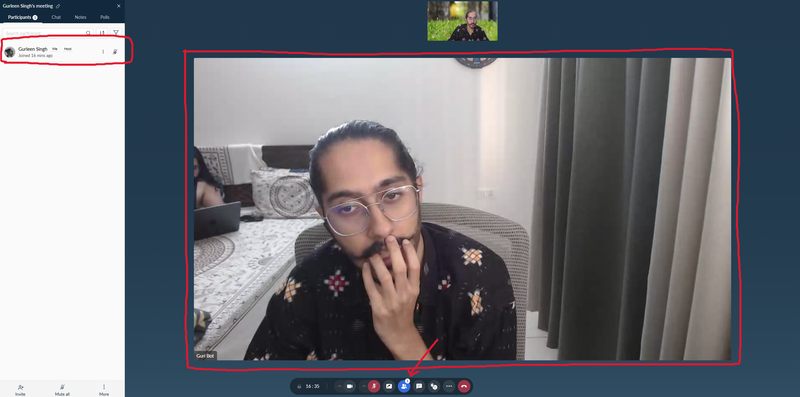
Video tiles stuck after users leave: A participant's video tile remained on screen after they had already left the call. Zoho Meeting was still showing their frozen video feed for 5 mins as if they were present — with no indication they had disconnected.
Sign-in field non-clickable: On the desktop app, the email input field on the sign-in screen was completely non-clickable. The only fix was force-quitting and restarting the app twice.
Mute/unmute stops responding: The mute button intermittently stops working — you click it, and nothing happens. You are either stuck muted or stuck unmuted with no visual feedback that the control has failed.
Videos freezing mid-call: Participant video feeds freeze randomly during calls, requiring the affected user to toggle their camera off and on to restore the stream.
In a client-facing meeting, any one of these bugs does not just look unprofessional. It raises questions about what else the tool is getting wrong behind the scenes.
Original Benchmark: Zoho Meeting vs Cosmos Performance Test
We ran a standardised five-person video call benchmark — all cameras on, same hardware, same internet connection, same time of day — and measured system resource usage for both platforms.
Hardware-

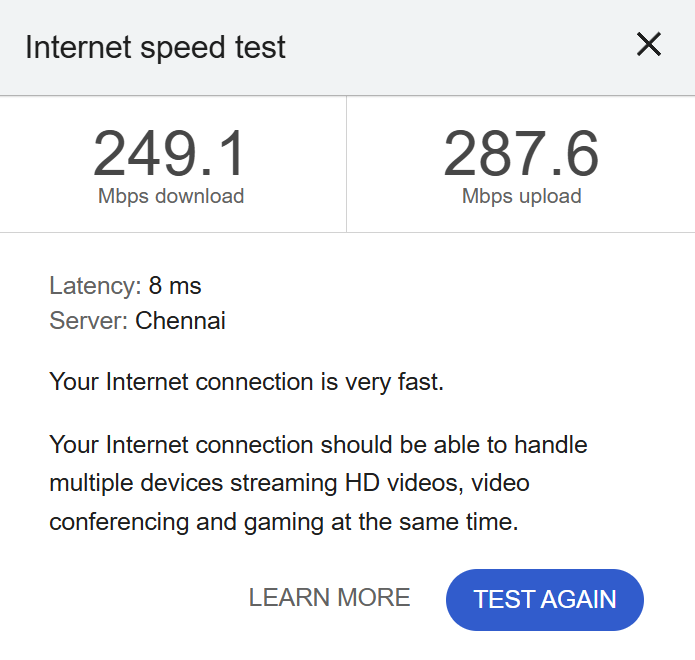
Internet-
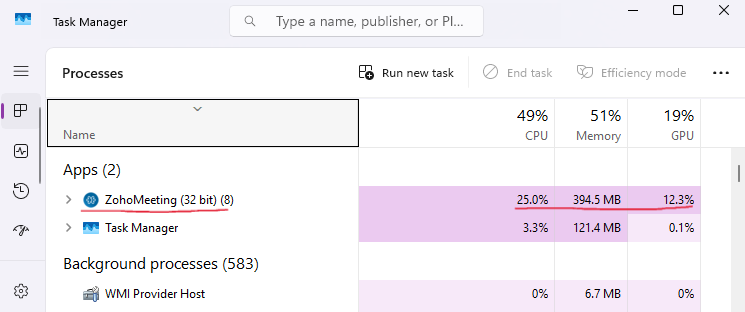
Zoho Meeting (5-Person call) -
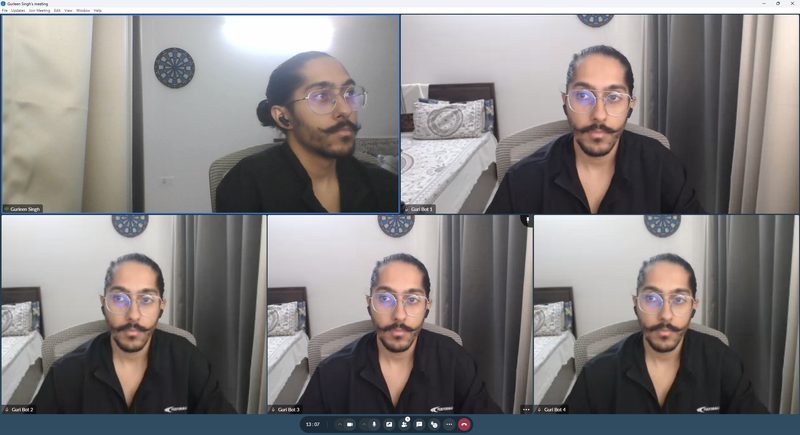
Cosmos (5-Person call) -
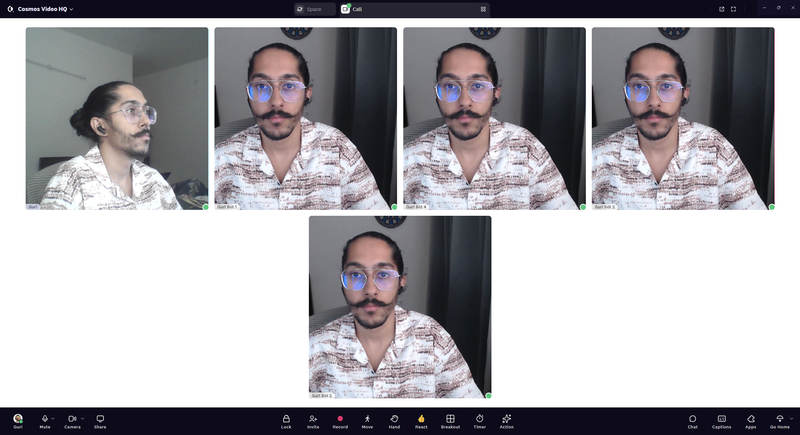
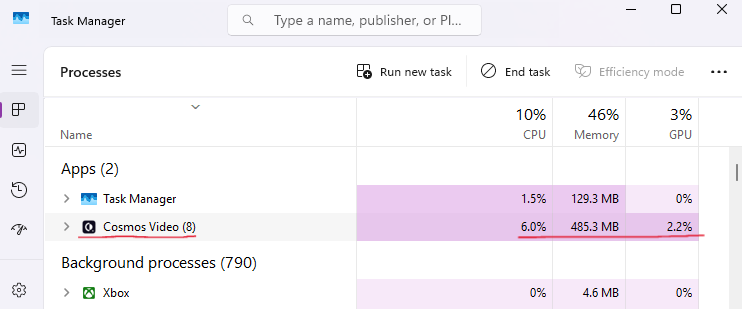
Head-to-Head
The numbers tell a clear story. Zoho Meeting uses over four times the CPU and nearly six times the GPU of Cosmos for the same five-person call. The one metric where Zoho comes out ahead — memory — is marginal (91 MB difference), and irrelevant next to the CPU and GPU gap.
Why does this matter? CPU usage directly affects how responsive your machine feels during a call. At 25% CPU for a video call alone, Zoho is consuming a quarter of your processing power before you have even opened a spreadsheet, a browser, or your IDE. On an 8-core machine, that is two full cores dedicated to keeping five video tiles alive.
GPU usage matters even more on laptops. At 12.3%, Zoho is pulling significant graphics processing power — which translates directly to battery drain and thermal throttling. If your laptop does not have a dedicated GPU (and most business laptops do not), that GPU workload falls back onto the CPU, compounding the problem further. Cosmos at 2.2% GPU barely registers.
The practical difference: your fans stay quiet, your battery lasts longer, and your other applications do not slow down. For teams that live in video calls — standups, client sessions, pair programming — this is the difference between a machine that feels responsive all day and one that starts lagging by the second meeting.
Security: Zoho Corp's Vulnerability Track Record
Is Zoho meeting safe? Is Zoho app safe? To answer that properly, you need to look beyond Zoho Meeting itself and examine the security posture of Zoho Corporation — the company that builds and maintains the platform.
Chinese State-Sponsored Attacks via Zoho Products
Multiple Chinese government-backed hacking groups have exploited Zoho vulnerabilities in high-profile attacks:
APT27 (2021): Exploited CVE-2021-40539 in Zoho ManageEngine ADSelfService Plus. CISA warned that attackers scanned over 300 vulnerable organisations and compromised at least 9 companies.
Red Cross Breach (2021-2022): Attackers exploited the same Zoho vulnerability to breach the International Committee of the Red Cross. Hackers maintained access for 70 days, compromising the personal data of 515,000+ highly vulnerable people — victims of armed conflict, missing persons, and detainees.
Volt Typhoon (2024): Chinese state-backed APT used a critical Zoho ManageEngine vulnerability for fresh cyberattacks targeting critical infrastructure.
APT41: Exploited vulnerabilities in Cisco, Citrix, and Zoho ManageEngine Desktop Central at over 75 customers — described as the broadest Chinese cyber espionage campaign observed in recent years.
These are not Zoho Meeting vulnerabilities specifically. But when CISA issues warnings about your parent company's products, when the Red Cross gets breached through your infrastructure, and when multiple Chinese APT groups treat your products as a reliable attack vector — the trust question is legitimate.

Fair Note on Privacy
Zoho has a genuinely strong privacy stance. They do not sell user data, do not run ads, and have maintained this commitment for over 25 years. Their privacy model is better than Google's. But privacy policy and security engineering are two different things. You can have excellent data-handling principles and still have products that are routinely exploited by nation-state hackers.
How Cosmos Handles Security
Cosmos Video encrypts all data in transit with TLS 1.2+ and at rest with AES-256. The platform holds SOC 2 Type II certification — independently audited — and is fully GDPR compliant. Customer call data is never processed for AI training. Security features are not gated behind pricing tiers. Zero security breaches on record.
Features: Where Zoho Meeting Falls Short
What Both Platforms Cover
The "paid only" markers tell the story. Zoho Meeting paywalls recording, AI transcription, and breakout rooms across different tiers — with the most useful features locked behind the Professional plan. On Cosmos, recording and AI summaries are included on the free plan with seven-day cloud storage.
Where Cosmos Goes Further
Here is why the key differences matter.
Desktop App — But Buggy: Zoho Meeting does have a native desktop app, but the experience is rough. During our testing, basic issues arose — the email input field on the sign-in screen was unclickable and required a full app restart to fix. For features such as screen-sharing annotations, you still need to download a separate browser extension. The Zoho meeting app exists, but "exists" and "works reliably" are two different things. Cosmos runs as a standalone application with full OS-level integration for notifications, audio device control, and window management — and it works out of the box.
No Private Messaging: Zoho Meeting's in-call chat is visible to every participant. Need to quietly check something with a colleague during a client call? Not possible. Cosmos supports DMs to any participant during a call — the way professional communication should work.
Screen Sharing: One Person, No Collaboration: Only one participant can screen share at a time in Zoho Meeting — and only the presenter can annotate on their own screen. Participants cannot draw, highlight, or mark up what they are seeing. Cosmos supports multiple simultaneous screen shares, participant annotation, and up to 3K at 30 fps.
No Embedded Apps: If your team needs to review a Miro board, a Google Doc, or a Google Sheet during a Zoho Meeting, the only option is limited screen share — where only the sharer can interact. In Cosmos, you paste any URL into the call, and it opens as a shared, interactive view for all participants. No plugins, no setup.
No Spatial Audio, No Always-On Workspace: Zoho Meeting is a scheduling tool. You create a link, people join, the call happens, everyone leaves. Between meetings, your team is invisible. There is no way to know who is available, who is heads-down, or who just stepped out for lunch. Cosmos replaces that model with a persistent virtual workspace where your team is always present — walk over and talk, no invite required.
Recording: Paywalled and Limited: There is no Zoho meeting recording on the free plan. Standard plans get 5 GB of cloud storage per host — roughly a few hours of video. Need more? That is $20/month for an additional 25 GB. Transcripts are only on Professional. And users report inconsistent recording quality: "sometimes it records okay, but when you view the recording, the sound is terrible" — Lucy M. On Cosmos, recording with AI summaries, transcripts, and clickable timestamps is included on all plans — the free tier gets seven-day cloud retention.
Cosmos Is More Than a Meeting Tool
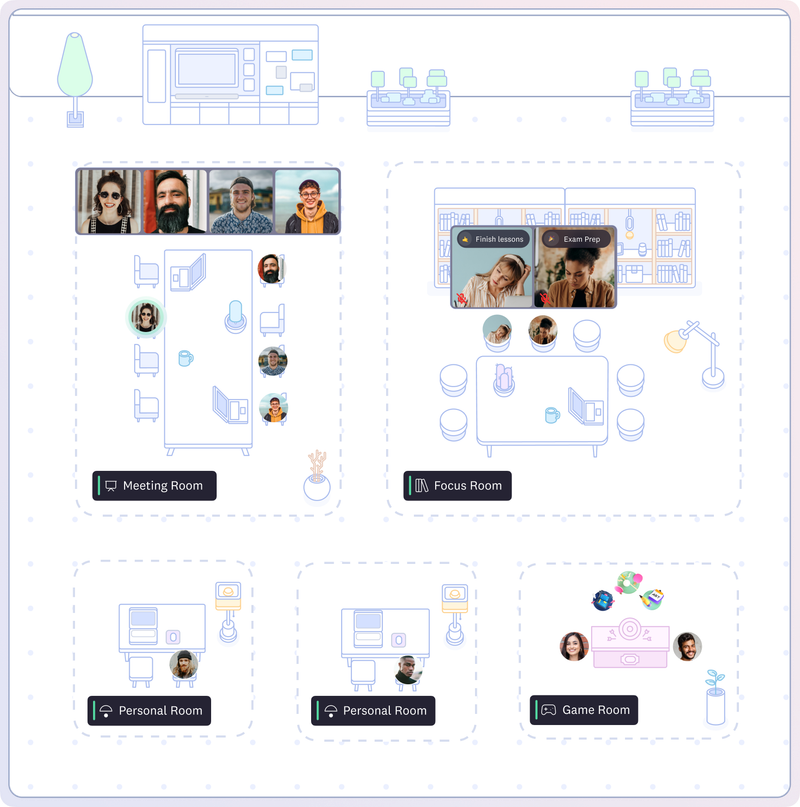
Zoho tries to solve the "disconnected team" problem by offering 55+ separate apps — Cliq for chat, Projects for task management, CRM for sales, Meeting for calls. The idea is that if you buy enough Zoho products, the pieces eventually fit together. In practice, your team bounces between a dozen tabs and never has a single place where everyone is visibly present.
Cosmos takes the opposite approach. Instead of fragmenting your team across separate tools, it puts everyone in one persistent virtual workspace — a shared space that stays open all day. You see who is around, who is busy, and who is free to talk. No scheduling, no tab-switching, no guessing.
The difference is structural. Zoho Meeting is a calendar event. You schedule it, attend it, and close it. What happens between meetings? Nothing. Your team disappears until the next invite. Cosmos keeps the room open. Your digital space is always there — walk over to a colleague for a 30-second question instead of booking a 30-minute call.
Real results:FRONTIER, a 30-person VFX studio, replaced their previous video tool with Cosmos and cut 45 minutes of wasted time per employee per day — largely by eliminating unnecessary scheduled meetings in favour of quick walk-over conversations. Reconciled, a 60-person accounting firm, found that having a persistent shared space created stronger team bonds and faster project delivery than any combination of separate tools could.
Pricing: Per-Host vs Concurrent
Zoho Meeting Pricing
Here is what Zoho Meeting pricing looks like in 2026. The Zoho meeting plans are structured per host, per month:
The Zoho meeting cost is low — there is no getting around that. At $1–3 per host per month, Zoho Meeting is one of the cheapest video conferencing tools on the market. But every person who needs to host a meeting requires their own paid licence. For teams where multiple people run calls — standups, client meetings, one-on-ones — the per-host model means more licences than you might expect. Plus, Zoho being so buggy, the low price is hit or miss.
Hidden Zoho meeting pricing extras: additional recording storage costs $20/month for 25 GB. Premium support is an additional 20% of your total licence fee — meaning even support is an upsell.
How Cosmos Pricing Works
Cosmos uses a concurrent pricing model: you pay based on the peak number of people online at the same time, not the total headcount or the number of hosts. Premium costs $8.80 per concurrent user monthly, or $7.70 on an annual plan. Any team member can host — there is no host-specific licensing.
Side-by-Side Cost Comparison
Team of 20, where 10 people are online concurrently:
Zoho is cheaper. That is not in question. At $1–3 per host per month, it is one of the most affordable video tools on the market. A 20-person team on Zoho Pro pays $720/year. The same team on Cosmos — with 10 concurrent seats — pays $924/year. The question is what that price buys you, and what it does not.
For the price of a Cosmos subscription, you get: a modern AV1 codec (not VP8 from 2010), 3K screen sharing at 30 fps (not 2K at 10 fps), private messaging, embedded apps, spatial audio, an always-on virtual workspace, 15 built-in team games, and recording with AI summaries on every plan including free. Zoho Meeting does not offer any of these features at any price tier.
The difference is not just features — it is the category of tool. Zoho Meeting is a bare-bones video call utility. Cosmos is a virtual workspace that replaces your meeting scheduler, team chat, and office presence tool in one. If all you need is a cheap way to make calls, Zoho Meeting does that. If you need your remote team to actually feel like a team, the maths looks different.
What Teams Say After Switching to Cosmos
The most common reaction from teams that move to Cosmos is surprise — not at any single feature, but at how different daily work feels when your team has a shared space instead of a collection of scheduled calls.
"It allows a real-life feel to a virtual experience which fosters a deep sense of connection! It is MORE than what typical video conferencing tools provide — this builds community!" — Shade O., Events Strategist, G2 Review
"It's definitely the best way we've found to work remotely, and it's the closest we've felt to being in person. Clicking on someone to start a conversation is far more natural than constantly sending meeting links — just like tapping on someone's shoulder at the office!" — Liam M., G2 Review
"My team is remote and geographically spread. Using Cosmos has enabled us to collaborate and stay in touch during the workday. It's great for informal collaboration on projects and provides a central place for the team to meet." — Matthew W., G2 Review
"With Cosmos, we can host meet-ups with colleagues, conduct virtual stand-up meetings, and even indulge in a bit of friendly gossip. It's an effective way to strengthen team bonds on a daily basis." — Patala N., G2 Review
More stories are on the Cosmos case studies page, including teams across VFX, accounting, education, and marketing who have replaced scheduled-call tools with a persistent Cosmos workspace.
FAQ
What is Zoho Meeting?
Zoho Meeting is a Zoho online meeting and webinar tool built by Zoho Corporation, an Indian software company known for its suite of 55+ business applications. It offers basic Zoho Meeting video call capabilities, including screen sharing, recording (paid plans), and breakout rooms (Professional plan only). The Zoho meeting free plan supports up to 100 participants with a 60-minute group call limit.
Is Zoho Meeting free?
There is a Zoho meeting free plan, but it comes with significant limitations: a 60-minute zoho meeting time limit on group calls, no recording, no breakout rooms, and no annotation tools. Is Zoho Meeting free enough for serious work? Most teams will hit those limits quickly. Are Zoho meetings free worth considering? Only as a trial — not as a long-term solution. Cosmos offers a free plan with no time limit, recording with AI summaries, and seven-day cloud storage.
Is Zoho Meeting safe?
Zoho Meeting itself uses DTLS-SRTP encryption in transit and AES-256 at rest. But is the Zoho app safe when you consider the broader picture? Zoho Corporation's ManageEngine products have been exploited by Chinese state-sponsored hackers (APT27, Volt Typhoon, APT41), including a breach of the Red Cross that compromised data of 515,000+ people. Cosmos holds SOC 2 Type II certification, is fully GDPR compliant, and does not gate security features behind pricing tiers.
How much does Zoho Meeting cost?
Zoho meeting pricing starts at $1/host/month (annual) for Standard and $3/host/month for Professional. The Zoho meeting cost is genuinely low — but every host needs a separate licence, recording storage is capped at 5 GB per host, extra storage costs $20/month for 25 GB, and premium support adds 20% to your licence fee. Cosmos Premium costs $7.70/concurrent user/month (annual) and includes recording, AI summaries, and 4K screen sharing on all plans.
Why is the Zoho Meeting video quality poor?
Zoho Meeting runs on the VP8 video codec — a technology from 2010. The industry has moved two generations ahead to AV1. VP8 produces lower quality video at the same bitrate, which directly explains the consistent Zoho meeting reviews complaining about blurred video, pixelation, and choppy performance. Cosmos runs on the AV1 codec, delivering crisper video at lower bandwidth.
Does Zoho Meeting have a time limit?
Yes. The zoho meeting limit on the free plan is 60 minutes for group calls. Paid plans (Standard and Professional) remove the time restriction. Cosmos has no time limit on any plan — free or paid.
Does Zoho Meeting have recording?
Zoho meeting recording is not available on the free plan. Standard plans include recording with 5 GB of cloud storage per host. AI-powered Zoho meeting transcription is only on the Professional plan. Cosmos includes recording with AI summaries, transcripts, and clickable timestamps on all plans — including the free tier with seven-day retention.
What are the best Zoho alternatives?
For teams looking for Zoho alternatives or an alternative of Zoho for video conferencing, Cosmos Video is the strongest option for remote teams. It offers a modern AV1 codec, a reliable native desktop app, concurrent pricing, recording on all plans, and a persistent virtual workspace. If you want Zoho alternatives free of Zoho's limitations, Cosmos's free plan covers video calls, recording, and AI summaries with no time limit.
How does Zoho Meeting compare to Zoom?
In a Zoho meeting vs Zoom comparison, both tools have limitations. Zoom has better video quality and a native app, but carries $235M+ in security lawsuit settlements and uses per-seat pricing. Zoho Meeting is cheaper but runs on an outdated codec with documented reliability issues. Cosmos outperforms both: AV1 codec, native app, concurrent pricing, and a persistent workspace that neither Zoho nor Zoom offers.
What are Zoho Meeting's main features?
Zoho meeting features include HD video calls (720p on VP8), Zoho meeting screen sharing, in-call chat, reactions, calendar integration, and a mobile app. The Zoho meeting app supports up to 250 participants on the Professional plan. However, recording, breakout rooms, E2E encryption, and transcription are all gated behind paid tiers. Cosmos includes recording and AI summaries on the free plan and does not paywall core collaboration features.
Try Cosmos Free
Zoho Meeting is what happens when a company known for "good enough" tools builds a video conferencing product. It checks the boxes on paper — calls, screen sharing, recording — but the execution tells a different story. Blurry video from a 2010 codec. Meetings that crash without warning. Features are paywalled across three pricing tiers. And a security track record that makes enterprise teams nervous.
If your team deserves better than "technically works", Cosmos Video is worth thirty seconds of your time. Sign up, create a space, invite your team. The video quality difference is visible from the first call. The workspace difference becomes obvious within a day.
Free to start. No time limit. No credit card required.
Comments
Your comment has been submitted