It's 10:47am. You need a quick answer from Sarah about the client presentation.
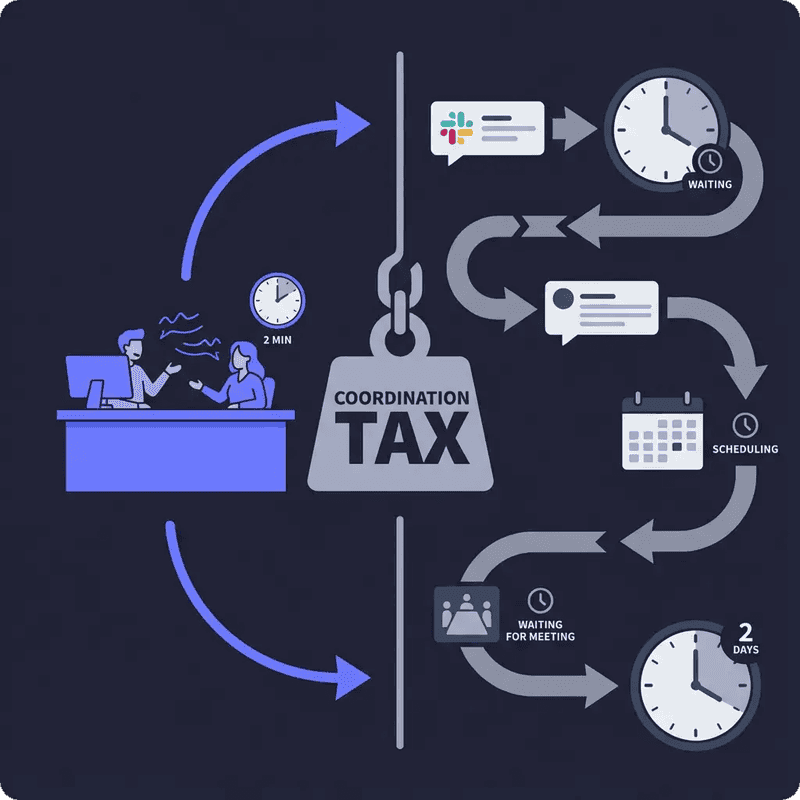
In a physical office, you'd walk to her desk. "Hey Sarah, which font did we decide on?" Two minutes. Done.
Remote work version: Open Slack. Type message. Wait. Check back 30 minutes later—no response. She's probably in a meeting. Send another message. Still nothing. Fine, let's schedule a call. Open calendar. Find mutual availability. Tomorrow at 2pm. Send Zoom link. Wait 28 hours for a 2-minute answer.
Your 2-minute question just became a 2-day project.
This isn't a "Zoom vs Google Meet" debate. This is about a fundamental mismatch: traditional video conferencing tools were never built for daily teamwork. They were designed to replace scheduled meetings, not replace the office itself.
And that mismatch is costing teams billions of hours annually.
This article examines why traditional video conferencing creates coordination friction, how virtual office platforms solve different problems, and which approach actually fits remote teamwork in 2025.
The Hidden Cost of Video Conferencing for Remote Teams
It's Not About the Video Quality
Zoom works perfectly for what it was designed to do: host scheduled meetings.
Crystal-clear video. Screen sharing. Breakout rooms. Recording. Chat. Reactions. Virtual backgrounds. The features are excellent.
The problem isn't the tool. It's how remote teams are forced to use it.
When every interaction—including 30-second questions—requires scheduling, link creation, link distribution, and coordinated joining, you've built a system optimised for formal meetings, not spontaneous collaboration.
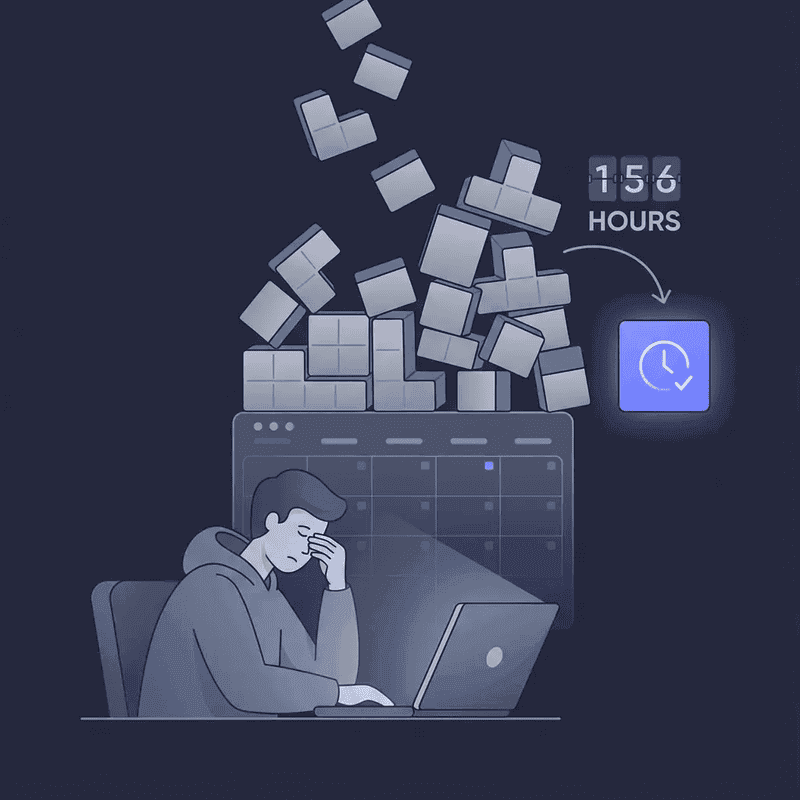
According to 2024-2025 research, 43% of workers spend 3+ hours weekly just scheduling meetings—not attending them, just coordinating when they'll happen.
That's 156 hours per year per person spent on calendar Tetris. Before a single meeting actually occurs.
The Meeting Link Multiplication Problem
Here's what happens in a typical globally distributed team:
Monday morning Slack thread:
- "Can we discuss the Q4 roadmap?"
- "Sure, when works for you?"
- "I'm free 2-4pm GMT"
- "That's 3am for me, can we do 9am GMT Tuesday?"
- "I have a conflict then, how about Wednesday 1pm?"
- "Let me check... yes that works"
- "Great, I'll send a Zoom link"
- Creates meeting, copies link, pastes in Slack
- Thursday: "Hey which Zoom room is this? Can't find the link"
- "Let me resend it..."
Total time invested: 30+ minutes of back-and-forth messages, calendar checking, and link management.
Actual meeting duration: 15 minutes.
According to the 2025 State of Meetings Report, the average employee spends 392 hours per year in meetings—more than 16 full workdays—with meeting time costing an average of $29,000 per employee annually.
But that only counts meeting attendance. It doesn't count the coordination tax: the tiny text conversations about "which link?", "when works?", "can you resend?", and "did that meeting get moved?"
Those micro-conversations add up to hours of wasted time weekly.
The Context-Switching Spiral

Your typical remote worker's morning:
- 9:03am: Check Slack (3 new channels, 12 unread messages)
- 9:12am: Open email (23 new messages)
- 9:18am: Click Zoom link for standup
- 9:45am: Back to Slack, respond to urgent question
- 9:52am: Open Asana to update task status
- 10:05am: Switch to Google Docs for presentation
- 10:23am: Jump back to Slack (someone @ mentioned you)
- 10:31am: Click different Zoom link for client call
- 11:15am: Return to Google Docs
- 11:22am: Slack notification pulls you away again
- 11:30am: Check calendar for next meeting
- 11:35am: Click another Zoom link
Result: You're spending more time managing tools than actually working.
Research shows that employees check email or Slack every six minutes, resulting in 80+ daily interruptions. After each interruption, it takes an average of 23 minutes to regain focus.
More critically, over 50% of respondents blamed switching between apps as a barrier to getting essential work done, with teams losing approximately 2 hours daily to app jumping.
The productivity math:
- 80 interruptions × 23 minutes recovery time = 1,840 minutes = 30.6 hours
- That's nearly 4 full workdays lost per week to context switching
Traditional video conferencing doesn't create this problem alone. But it contributes by existing as yet another separate tool requiring yet another link, yet another app window, yet another mental context.
The Isolation Paradox
Here's the strange contradiction: video conferencing tools technically "connect" you to teammates. You see their faces. You hear their voices. You collaborate on shared screens.
But 40% of remote employees report feelings of isolation and loneliness despite using these tools daily.
Why?
Because traditional video conferencing is transactional. You schedule a meeting. People join at a specific time. You talk. Everyone leaves. The space disappears the moment the call ends.
There's no lingering in the hallway after the meeting. No spontaneous "oh hey, while I've got you..." moments. No casual awareness of who's around, who just wrapped up a call, who's deep in focus work.
The tools technically work. But they don't replicate the ambient connection of working near other humans.
What Traditional Video Conferencing Was Actually Designed For
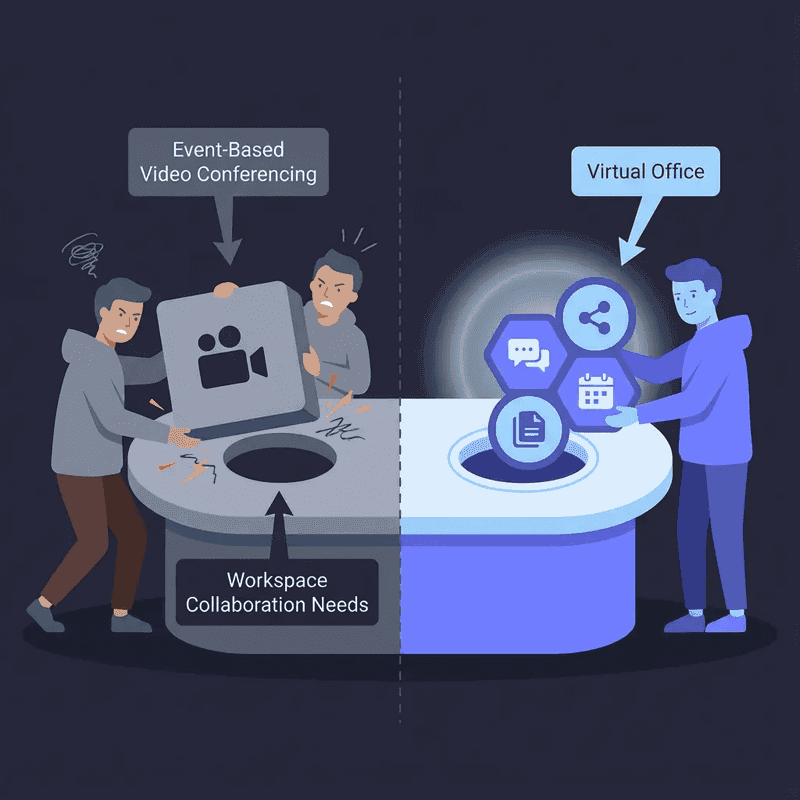
Event-Based vs. Workspace-Based
Understanding the problem requires understanding the original design intent.
Zoom, Google Meet, Microsoft Teams—these platforms were built to replace:
- Quarterly board meetings
- Client presentations
- Training webinars
- Conference calls with external partners
- Structured team meetings with agendas
They were NOT built to replace:
- Walking to someone's desk for a quick question
- Spontaneous whiteboard sessions when 3 people are discussing something
- Natural conversations near the coffee machine
- Casual awareness of who's around and available
- After-meeting hallway conversations
Video conferencing platforms are event-based: temporary spaces that exist only during scheduled time blocks.
Physical offices are workspace-based: persistent environments that exist continuously, where you see teammates, gauge availability through social cues (headphones = focus mode, not at desk = unavailable), and interact spontaneously.
The mismatch creates dysfunction.
The Technical Limitations Nobody Talks About
Try this experiment: Open Zoom at 9am. Keep it running until 5pm.
What happens:
- Your laptop fans start spinning by 11am
- Battery drains completely by 1pm (even when plugged in, heat accumulates)
- CPU usage spikes to 60-80% sustained
- Other applications slow down noticeably
- Your laptop becomes uncomfortably hot
Traditional video conferencing platforms consume significantly more CPU resources during all-day use compared to platforms optimised for persistent presence.
Why? Because Zoom was engineered for 1-hour meetings, not 8-hour workdays.
The codec optimisation, video processing pipelines, and resource allocation strategies assume:
- Short duration (60-90 minutes maximum)
- High engagement (everyone actively participating)
- Full video feeds from all participants
- Intensive screen sharing and feature usage
None of these assumptions hold for "virtual office" use cases where:
- Duration is 8+ hours
- Most time is spent working independently (video/audio dormant)
- Presence matters more than constant transmission
- Efficiency and battery preservation are critical
This isn't a critique of Zoom's engineering—it's simply a tool being used for a purpose it wasn't designed to serve.
The Awareness Gap
In a physical office, you have ambient awareness:
- You see Sarah's at her desk, headphones off → probably available
- Tom's in the conference room with clients → definitely not available
- The design team is clustered around a whiteboard → something interesting is happening, maybe join if relevant
- Jen just returned to her desk after a long call → good time to ask a quick question
This awareness is passive. You don't need to actively check. You simply observe as part of being in the environment.
Slack's approach: Green dot = online. That's all you get.
But "online" doesn't mean "available." Someone might be:
- Deep in focus work (don't interrupt)
- On a different call (can't respond)
- Technically logged in but away from desk (won't see message)
- In a flow state writing code (interruption will break concentration)
According to 2024-2025 research, 38% of managers say collaboration has become more difficult in remote settings, largely because this awareness infrastructure disappeared.
You're always either:
- Interrupting blindly (sending messages without knowing if someone's available)
- Over-scheduling (turning every interaction into a formal meeting to ensure participation)
Both options create friction. Neither recreates the effortless coordination of physical offices.
The Alternative: Remote Collaboration Tools (Virtual Offices)
Category Education: What's the Actual Difference?
Most people think "remote collaboration tools" and "video conferencing" are the same category. They're not.
Video Conferencing (Traditional):
- Event-based (space exists only during calls)
- Requires links for every interaction
- Optimised for scheduled meetings
- High CPU usage if used all day
- Transactional (join → talk → leave)
- No ambient awareness of teammates
Virtual Office Platforms (Collaboration Tools):
- Workspace-based (persistent space exists continuously)
- Single global link (like a physical address)
- Optimised for all-day presence
- Efficient CPU usage for extended sessions
- Continuous (teammates are "in the office" together)
- Ambient awareness through visual presence
The global market for virtual collaboration platforms is projected to grow from $20.5 billion in 2024 to $36.1 billion by 2030, with 65% of companies expected to use AI-powered collaboration functionalities by 2025.
This isn't a niche experiment. It's a fundamental shift in how distributed teams work.
How Virtual Offices Eliminate Coordination Friction
Remember the Sarah font question from earlier? Here's how it works in a virtual office:
10:47am: You open your virtual office. You see Sarah's avatar at her "desk" with status showing "Available."
You walk your avatar near hers. Audio/video connects instantly—no link, no clicking "start call," no 30-second connection ceremony.
"Hey Sarah, quick question—which font for the client deck?"
"Arial, 18pt for headlines."
"Perfect, thanks!"
Total time: 90 seconds.
No scheduling. No link sending. No calendar checking. No waiting hours for a Slack response.
This is what Frontier's production team experienced:
"Our team was drowning in back-to-back Zoom calls, spending more time scheduling meetings than actually collaborating. We tried Slack for quick questions, but the back-and-forth took forever and people felt anxious about reply times."
After switching to a persistent virtual office:
"Our employee NPS increased by 20% as a result. It created a stronger sense of belonging. We use it daily for meetings, review sessions, and weekly all-hands."
The difference? Instant access without scheduling overhead.
The Single Link Revolution
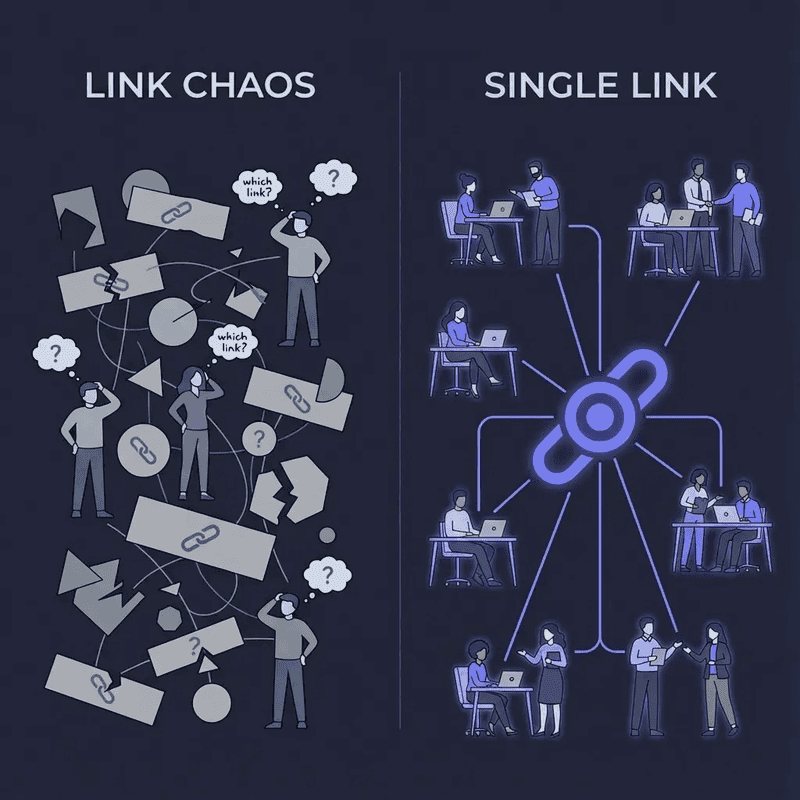
One of the most underrated benefits of virtual office platforms: one permanent link.
Your team memorises it. Bookmarks it. Uses it every day. It's your team's digital address.
Compare this to Zoom:
- Different link for every meeting
- Calendar invites to track them all
- "Which link was that?" confusion
- Lost links requiring resharing
- Guest access requiring new links
- Broken links when meetings are rescheduled
Research shows that 43% spend 3+ hours weekly just on meeting coordination. A significant portion of that time is link management: creating, sending, finding, resending, updating.
With virtual offices, that entire category of friction disappears.
True Statuses: Solving the Availability Problem
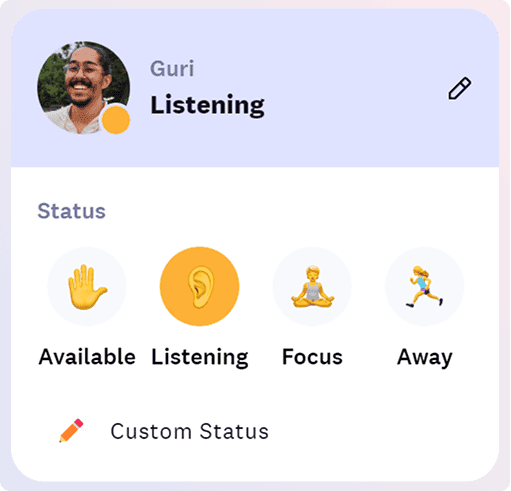
Slack's green dot tells you someone's logged in. That's it.
True Statuses solve the awareness problem with intelligent availability indicators:
Available → Ready to talk, walk over anytime
Listening → Working but can hear if someone approaches, will respond if needed
Focus → Deep work mode, don't interrupt unless urgent
Away → Not at desk, message instead
These statuses auto-switch based on calendar and behaviour, giving teammates accurate information without manual updates.
You know before approaching whether someone's interruptible. That solves the "am I being annoying?" anxiety whilst preserving instant access for those who are available.
The Performance Advantage
Virtual office platforms built for all-day use optimise differently:
- Efficient codecs that minimise CPU usage during dormant periods
- Spatial audio that only transmits when avatars are near each other
- Adaptive video that reduces quality when you're not actively in conversation
- Lightweight presence that shows avatars without constant video streaming
According to competitive performance analysis, platforms optimised for persistent use achieve 10.4% CPU usage compared to 20%+ for traditional video conferencing during all-day sessions.
Practical result: Your laptop doesn't scream, your battery lasts, your fans don't sound like a jet engine, and you can actually multitask without lag.
The Honest Comparison: When Each Approach Wins
When Traditional Video Conferencing Is Better
Let's be honest: video conferencing isn't wrong for everything.
Use traditional video conferencing when:
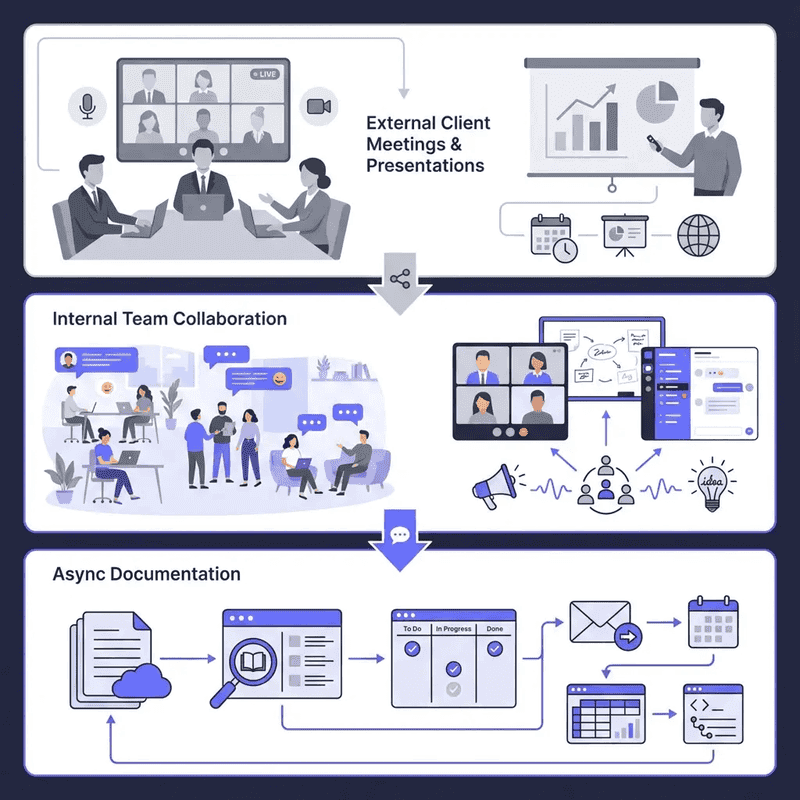
1. External meetings with clients or partners
Your clients already have Zoom. They don't want to download new software or learn new interfaces. Sending a Zoom link is frictionless for them.
2. Large formal presentations (50+ participants)
Webinars, all-hands meetings, training sessions—these are genuine "events" where the event-based model makes sense.
3. Scheduled interviews and demos
When you're meeting someone once or twice, the overhead of onboarding them to a virtual office isn't worth it.
4. Teams with strong async culture and minimal synchronous needs
If your team rarely needs real-time collaboration and prefers async-first workflows, persistent presence adds little value.
5. Recording and compliance requirements
Some industries have strict requirements for meeting documentation. Traditional platforms have mature recording, transcription, and compliance features.
Nobody's arguing you should abandon Zoom entirely. It's a valuable tool for specific use cases.
When Virtual Office Platforms Are Better
Use virtual office platforms when:
1. Internal team collaboration is primarily synchronous
If your team needs frequent quick check-ins, spontaneous discussions, and real-time feedback, persistent presence eliminates scheduling friction.
2. Coordination overhead is crushing productivity
If you're spending 3+ hours weekly on meeting scheduling, or waiting hours/days for simple answers, you need instant access.
3. Remote isolation is hurting morale
If 40% of your remote team reports feelings of isolation, they need more than scheduled meetings—they need ambient connection.
4. Context switching is destroying focus
If your team is jumping between Slack, Zoom, Asana, and Google Docs 20+ times daily, consolidating communication into one persistent space helps.
5. You want to replicate office spontaneity
If you miss the "hey got a sec?" interactions, spontaneous whiteboard sessions, and casual hallway conversations, virtual offices recreate those patterns.
Reconciled, a 60-person accounting firm, needed fast turnaround during crunch times:
"My remote team was struggling with isolation. Traditional communication tools like Slack made new team members hesitant to seek support—they felt anxious waiting for replies."
After moving to a virtual office:
"Everyone being available in our Cosmos space created a real sense of community. We go through crunch times much faster compared to back-and-forth messaging. For people who need community and quick support, it's a game-changer."
The pattern: When collaboration speed, spontaneity, and connection matter more than formal structure, virtual offices win.
The Hybrid Approach: Best of Both Worlds
You Don't Have to Choose One
Here's what actually works for most teams:
Virtual Office = Daily Workspace
- Team logs in during work hours
- Quick questions get instant answers
- Spontaneous collaboration happens naturally
- Ambient awareness of who's around
- Casual social connection
- Reduces meeting scheduling by 40%
Traditional Video Conferencing = Special Events
- Client meetings and external calls
- Large all-hands presentations
- Formal recorded sessions
- Interviews and onboarding
- Compliance-required meetings
The key is understanding which tool serves which purpose.
Migration Strategy: How to Transition Smoothly
Most teams fail at adopting virtual offices because they try to replace everything at once.
Better approach:
Week 1-2: Pilot with 5-10 people
- Choose early adopters who are excited about experimentation
- Use virtual office for one team only (e.g., engineering or design)
- Keep Zoom for everything else
- Measure: How many "quick questions" get answered faster?
Week 3-4: Expand to core team
- Invite remaining internal team members
- Establish "office hours" (e.g., 10am-3pm team is "in the office")
- Use virtual office for internal collaboration
- Continue using Zoom for client meetings
- Measure: How much meeting scheduling time decreased?
Week 5-8: Optimize workflows
- Define status norms (Available vs Listening vs Focus)
- Create custom floor plans matching team structure
- Set up focus rooms for body doubling during deep work
- Integrate calendar and Slack
- Measure: Team sentiment and adoption rates
Month 3+: Scale and refine
- Virtual office becomes primary internal workspace
- Zoom remains for external meetings
- Team naturally gravitates to instant collaboration
- Measure: Employee NPS, collaboration speed, meeting load
Frontier's production team used this approach:
"We didn't abandon Zoom overnight. We started using Cosmos for internal team coordination whilst keeping Zoom for client work. Within 2 months, our internal meeting load dropped by 40% and employee NPS increased by 20%."
The transition works when you solve real pain points first, not when you force wholesale replacement.
Addressing Common Objections
"We Already Have Too Many Tools"
Valid concern. Tool fatigue is real.
But consider this: are you adding a tool, or consolidating?
Before virtual office:
- Slack (for quick questions → but answers take hours)
- Zoom (for scheduled meetings → but scheduling takes hours)
- Calendar (to coordinate → constant back-and-forth)
- Email (for async → adds to overload)
After virtual office:
- Virtual office (for instant internal collaboration)
- Zoom (for external meetings only)
- Reduced Slack usage (quick questions answered instantly)
- Fewer calendar gymnastics
According to context-switching research, teams lose 2 hours daily to app jumping between communication tools.
If a virtual office reduces that by replacing Slack + Zoom for internal work, you're not adding—you're subtracting complexity.
"Won't This Create Constant Interruptions?"
No—if you respect status indicators.
That's the whole point of True Statuses:
- Focus = Do Not Disturb (equivalent to closed door in office)
- Away = Not at desk (don't approach)
- Listening = Working but can respond if needed
- Available = Ready to talk
In a physical office, you don't interrupt someone wearing headphones in a closed office. Same rules apply digitally.
The anxiety about interruptions usually comes from Slack, where there's no reliable availability signal. Everyone appears "online" even when they're unavailable, so every message feels like a potential interruption.
Virtual offices solve this by giving accurate, real-time availability information.
"What About Battery Life and Performance?"
Legitimate concern for traditional video conferencing used all-day.
Zoom wasn't designed for 8-hour sessions. CPU usage spikes, battery drains, laptops overheat.
Virtual office platforms optimised for persistent use solve this through:
- Efficient spatial audio (only transmits when needed)
- Adaptive video quality (reduces when not actively collaborating)
- Lightweight avatar presence (doesn't require constant video streaming)
- Intelligent resource allocation (dormant when you're working solo)
Performance benchmarks show that platforms built for all-day use achieve 10.4% CPU usage with minimal battery drain, allowing 6-8 hour battery life on laptops.
Test it yourself: Open your virtual office at 9am on battery power. Check at 5pm. Compare that to running Zoom all day.
"Will My Team Actually Use It?"
This is the #1 fear for decision-makers.
Adoption depends on solving real pain points, not forcing adoption:
Teams adopt virtual offices when:
- Coordination friction is genuinely painful (3+ hours weekly on scheduling)
- Leadership models behaviour (executives use it daily)
- Quick practical wins happen early (saved time, faster answers)
- Tool is genuinely easier than current workflow
- Team sees value within first week
Teams abandon virtual offices when:
- Forced adoption without clear pain point addressed
- Leadership doesn't use it (signals "not actually important")
- No quick wins (feels like extra work, not time savings)
- Technical issues or confusing UX
- Team doesn't see value quickly
Frontier's success story demonstrates this:
"We didn't mandate usage. We started with daily standups in our virtual office. When people saw how much faster they could get answers to quick questions, adoption happened naturally. Within 3 weeks, team members were asking why we were still scheduling some meetings instead of just 'walking over' in Cosmos."
Adoption isn't about coercion. It's about genuine value delivery.
Making the Decision: What's Right for Your Team?
Questions to Ask
1. How much time does your team spend scheduling meetings?
- If <1 hour/week per person → video conferencing is probably fine
- If 2-3 hours/week → virtual office will save significant time
- If 4+ hours/week → virtual office is essential
2. How often do simple questions turn into multi-day waits?
- Rarely → async workflows are working
- Occasionally → assess if frustration is building
- Frequently → coordination friction is crushing productivity
3. What's your team's loneliness/isolation level?
- Use Gallup's loneliness assessment
- If 20%+ report isolation → ambient connection needed
- If 40%+ → urgent culture problem requiring persistent presence
4. How distributed is your team?
- Single timezone, occasional remote → video conferencing works
- 2-3 timezones, mostly remote → hybrid approach recommended
- Fully distributed across 4+ timezones → virtual office for overlap hours, async for rest
5. What's your collaboration style?
- Async-first, minimal real-time needs → stick with async tools
- Mixed async/sync → hybrid approach (virtual office + async)
- Sync-heavy, frequent collaboration → virtual office essential
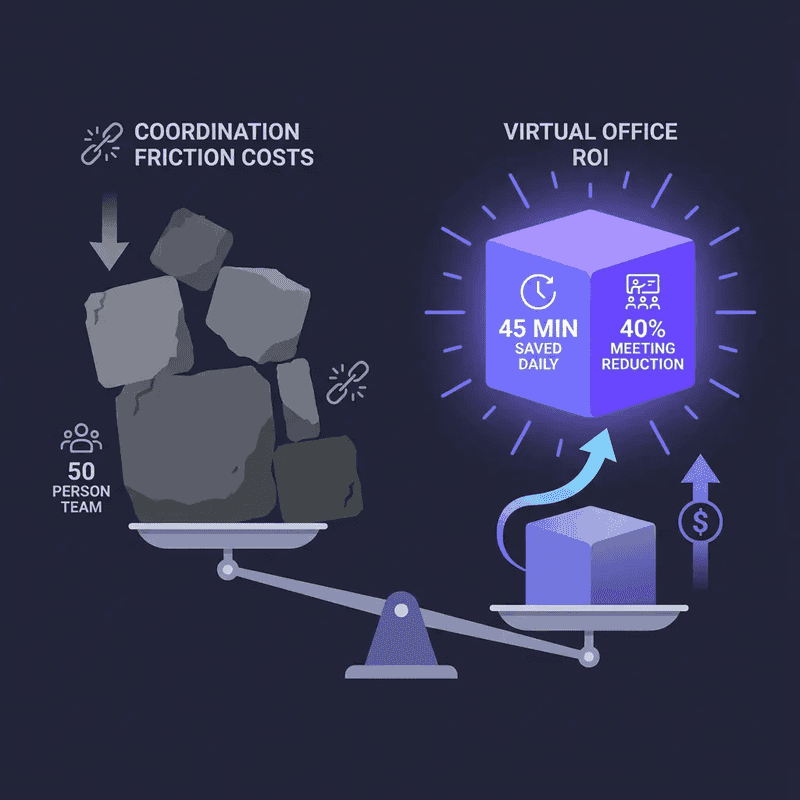
The ROI Calculation
Cost of coordination friction:
- 43% spend 3 hours weekly scheduling = 156 hours annually per person
- At $50/hour fully-loaded cost = $7,800 per person annually wasted on coordination
- For 50-person team = $390,000 annually lost to scheduling overhead
Cost of meeting overload:
- 392 hours per year in meetings per employee
- If 65% are unproductive = 255 wasted meeting hours annually
- At $50/hour = $12,750 per person annually
- For 50-person team = $637,500 annually lost to unproductive meetings
Potential savings from virtual office adoption:
- 40% reduction in scheduled meetings = $255,000 saved annually (50-person team)
- 45 minutes saved daily per person (Frontier case study) = $312,500 annually
- Total potential ROI: $567,500+ annually for 50-person team
Investment required:
- Virtual office platform costs: ~$149/month for 25 concurrent users
- Onboarding time: ~2-4 weeks for full adoption
- Payback period: <1 month
The math isn't even close. If coordination friction is genuinely painful, virtual offices pay for themselves in weeks.
Conclusion: The Tool Mismatch Everyone Tolerated
Here's what happened: when COVID-19 forced everyone remote in 2020, we grabbed whatever tools existed.
Zoom was available, familiar, and functional. Slack was already in use. Both technically "worked" for remote communication.
Five years later, we're still using event-based meeting tools for workspace-based collaboration needs.
We've normalised:
- Spending 3+ hours weekly scheduling meetings
- Waiting days for 2-minute answers
- Jumping between 4+ applications constantly
- Feeling isolated despite being "connected"
- Managing dozens of meeting links weekly
None of this is acceptable. It's structural dysfunction we've tolerated because "that's just how remote work is."
But it doesn't have to be.
Traditional video conferencing isn't bad. It's excellent for what it was designed to do: replace scheduled meetings.
Virtual office platforms aren't magic. They simply recreate the instant access, ambient awareness, and spontaneous collaboration that made physical offices productive.
The question isn't "which is better?" in absolute terms. The question is "which solves your actual problem?"
If your team is drowning in coordination overhead, waiting days for quick answers, and feeling isolated despite constant Zoom calls, you're using the wrong tool for the job.
Your 2-minute questions shouldn't take 2 days.
Take Action: Experience the Difference
Ready to eliminate coordination friction?
Try Cosmos free – no credit card required, live in 5 minutes. Experience instant "walk-to-talk" collaboration, 96kbps audio quality, and the feeling of working with your team, not just near them.
Explore case studies to see how teams like Frontier and Reconciled saved 45 minutes per employee daily by replacing coordination friction with instant access.
Compare virtual office platforms to find the solution that fits your team's size, workflow, and collaboration style.
The future of remote work isn't more meetings. It's less scheduling and more spontaneity.
Ready to try Cosmos Video?
See how a persistent virtual office changes the way your team works. Free for up to 4 concurrent users — no credit card, no time limits.
Tags
- remote collaboration tools
- traditional video conferencing
- video conferencing
Stay in the loop
Get the latest articles in your inbox. No spam, unsubscribe anytime.